Kling 4.0 officially launched on October 15, 2026, and in our hands-on tests its core upgrades are real: single 30-second takes, native 21:9 widescreen, reference-video camera control, two-speaker lip-synced dialogue, and true two-channel stereo sound all work today, while 10-bit HDR and two-minute extensions remain marked coming soon. Spoiler: reference videos (@video_1) and 40%-cheaper drafting on Kling 4.0 Flash are the upgrades that actually change how you produce shots; auto-cutting when you wanted one continuous move and garbled background shop signs are the two traps you still have to prompt around.
We are the ChatCut team, and Kling 4.0, Kling 4.0 Flash, and Kling 3.0 all run inside ChatCut’s Video Gen panel and timeline editor. To separate what shipped from launch-day copy, we inspected 12 generated clips across 8 test scenarios in ChatCut (6 newly rendered for this review totaling 31.63 credits, plus 6 clips from our November 11 model-page shoot verified from the same billing ledger), checked frame-by-frame continuity, transcribed the spoken audio, and measured the stereo tracks. Every clip, prompt, failure, and credit charge is below.
Key Takeaways
- Single 30-second clips hold together if you forbid cuts. Our 30-second night-market-to-rooftop shot stayed a true single take (zero cuts across 721 frames) and kept the actor’s jacket and paper bag of oranges consistent, because we explicitly wrote “no cuts” to override Kling’s default multi-shot splitter.
- Reference video (
@video_1) is the biggest leap over Kling 3.0. Passing a 10-second running clip alongside three felt-puppet reference images copied the camera’s side-track, 180-degree swing, and rising reveal without leaking the human runner or ocean into the scene, adding 20% to the credit cost (13.57 vs 11.28 credits at 1080p). - Two-speaker dialogue hits 3-second cues cleanly. Both voices in our 10-second coffee-shop test transcribed word for word, neither speaker moved their lips during the other’s line, and the card-reader beep landed right as the phone touched the terminal.
- Stereo audio is real, not dual-mono. Nulling left minus right on raw outputs showed Kling 3.0’s two audio channels are bit-identical (-inf dB difference), whereas every Kling 4.0 and 4.0 Flash clip carries genuine stereo separation (-21.6 to -34.0 dB L-R difference on environmental and action shots).
- Draft on Kling 4.0 Flash, finish on Kling 4.0. Flash costs 0.452 credits per second at 720p (4.52 credits for 10 seconds, 40% less than Kling 4.0 at 720p and 60% less than 1080p), and in ChatCut it accepts First Frame and Last Frame inputs too.
What Shipped in Kling 4.0 (and What Is Still Marked Coming Soon)
Kuaishou previewed Kling 4.0 at the end of September 2026 and announced its official October 15 launch the following day. Because Kling’s press releases, early blog overview, and November 4 Kling 4.0 User Guide mix live features with roadmap items, several third-party roundups repeat specs that are not live everywhere. Here is how Kling’s claims line up against what is live as of November 15, 2026, and what runs inside ChatCut today.
| Upgrade | What Kling claims | Status in our November 2026 ChatCut tests |
|---|---|---|
| 3 to 30-second single clips | Up to 30 seconds in 1-second steps (up from 15 seconds in 3.0) | Live and verified. 3 to 30 whole seconds in one generation (Test 1). |
| Native 21:9 ultrawide | Listed alongside 16:9, 9:16, and 1:1 in the November 4 User Guide (earlier press copy used future tense) | Live and verified. Outputs native 2200 × 940 at the 1080p tier for the same price as 16:9 (Test 7). |
| Reference videos + images | Up to 10 images and 5 reference videos (30 seconds total) | Live and verified. Combine up to 10 images (frames included) and 5 videos of 3 to 30 seconds in one ChatCut request using @image_1 and @video_1 (Tests 3 and 4). |
| Keyframes | First/last frames; standalone Keyframes tab on kling.ai lists up to 10 keyframes (cannot combine with references there) | First Frame and Last Frame live in ChatCut, combinable with reference images and videos, and supported on 4.0 Flash as well (Tests 2 and 8). |
| Resolution and 10-bit HDR | 720p, 1080p, 4K; 10-bit HDR marked “(coming soon)” in Kling’s User Guide | 720p and 1080p (8-bit SDR, 24 fps) in ChatCut. ChatCut does not offer 4K on Kling 4.0, and 10-bit HDR is still marked coming soon upstream. |
| Two-channel stereo & lip sync | Stereo output, multilingual dialogue, and up to 3 voice-profile audio references | Stereo and dialogue live and verified (Tests 5 and 6). ChatCut takes no audio references on Kling; add custom voices on the timeline afterward. |
| Video editing & 2-minute extension | Clip editing in Omni mode; multi-step extension up to 2 minutes marked “(Coming soon)“ | Not in ChatCut. Extend sequences by chaining First Frame and Last Frame clips on the timeline (Test 2). |
| Kling 4.0 Flash | 3 to 20 seconds, 720p SDR, lower cost, faster drafts | Live and verified. 0.452 credits/s in ChatCut; single 5-second job finished in 56 seconds (Test 8). |
How We Tested Kling AI 4.0: 8 Shots and Every Credit Spent
We designed 8 tests around the specific claims buyers ask about before spending credits on a new model: full 30-second coherence, frame-locked transitions, reference-video camera transfer, character consistency from non-studio stills, multi-speaker lip sync, stereo foley, 21:9 multi-shot commercials, and a three-way same-prompt run against Kling 4.0 Flash and Kling 3.0.
- No cherry-picking. Every clip below is the first completed render for its prompt. Where a shot cut unexpectedly, blurred past the lens, or painted fake text on a cart, we left it in and documented why.
- Verified on frames and waveforms. For every output, we extracted contact sheets across the full duration, ran automated scene-cut detection, ran ChatCut’s speech recognition on dialogue, and checked left-minus-right channel differences on the raw AAC audio streams.
- Exact ChatCut billing. Every credit figure comes from completed ledger deductions in ChatCut (not anonymous estimates). At current ChatCut rates, Kling 4.0 costs 0.7536 credits per second at 720p and 1.128 at 1080p; Kling 4.0 Flash costs 0.452 at 720p; Kling 3.0 costs 0.6048 at 720p and 0.8064 at 1080p (with a lower Omni rate when image references are attached).
| Test | What we checked | Model & settings | Credits in ChatCut | Verdict |
|---|---|---|---|---|
| 1. 30-second one-take | Continuous 30s tracking across 4 spaces without cuts or drift | Kling 4.0 · 30s · 1080p · 16:9 | 33.84 | Real (1 sign-text miss) |
| 2. First & Last Frame vs chain | 10s bookend transition vs chaining two 5s clips to lock a 5s midpoint | Kling 4.0 · 10s vs 2 × 5s · 1080p | 11.28 vs 11.28 | Real (crossfade audio join) |
3. Reference video (@video_1) | Copy camera path from a runner clip onto 2 felt puppets + village set | Kling 4.0 · 10s · 1080p · 3 imgs + 10s vid | 13.57 | Real |
| 4. Multi-image person refs | Pull one woman from 3 misty-dawn train stills into midday harbour sun | Kling 4.0 · 8s · 720p · 3 imgs | 6.03 | Mostly real (auto-cut at 5s) |
| 5. Two-speaker dialogue | 3 timed English lines across 2 speakers + card-tap action at the end | Kling 4.0 · 10s · 720p · 16:9 | 7.54 | Real |
| 6. Stereo environmental sound | True 2-channel stereo separation and synced crack/steam foley | Kling 4.0 · 10s · 1080p · 16:9 | 11.28 | Real |
| 7. Native 21:9 multi-shot ad | Native 21:9 resolution + 3 timed commercial cuts (0 to 3s, 3 to 6s, 6 to 10s) | Kling 4.0 · 10s · 1080p · 21:9 | 11.28 | Real |
| 8. 4.0 vs 4.0 Flash vs 3.0 | Same snow-wolf prompt on all 3 models + Flash First/Last frame check | 4.0 (1080p) / Flash (720p) / 3.0 (1080p) | 11.28 / 4.52 / 8.07 | Real (Flash takes frames too) |
8 Real Kling 4.0 Tests: What Worked and Where It Missed
1. 30-Second Single Clips: Real or Marketing?
Verdict: Real, provided you tell Kling not to cut. Kling 4.0 enables automatic multi-shot splitting by default, so an ordinary 30-second prompt will usually come back as a montage. Writing “One continuous 30-second take with no cuts” kept the camera rolling uninterrupted through all 721 frames from a wet night market, up an outdoor staircase, onto a lit rooftop, and out over a city skyline.
What our frame and audio check showed: Scene-cut detection found zero cuts across 30.04 seconds, and every four-part time window landed within roughly two seconds of the script: the wet lantern alley (0 to 8 seconds), the concrete-and-metal stairwell with potted plants and hanging laundry (8 to 18 seconds), the rooftop greeting at 20.4 seconds where he lifts the bag of oranges in his left hand and waves with his right, and the crane-up over the parapet onto the city lights (24 to 30 seconds). Across 19 seconds on screen, his dark green bomber jacket, white undershirt hem, and brown paper bag of four oranges never morphed. The stereo audio track (-22.2 LUFS, 16.1 LU loudness range) shifted cleanly across all four spaces: sizzling woks and crowd murmur, rhythmic footsteps every 0.7 seconds on the stairs, rooftop laughter, and a low city hum.
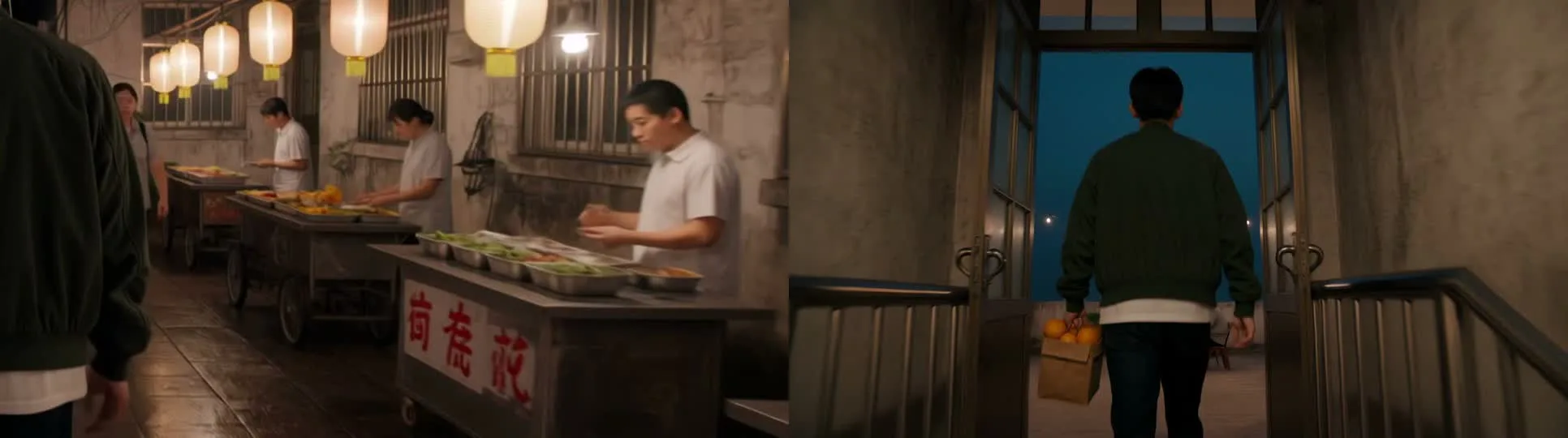
Where it missed: Even with “no text, no readable signs” at the end of the prompt, a food stall at 1.5 seconds carried three bold red pseudo-Chinese characters on a white placard. Also watch the price before clicking send at 1080p: 30 seconds at 1080p cost 33.84 credits (about 22.61 credits if you run the same 30 seconds at 720p, or 9.04 credits for a 20-second test on 4.0 Flash).
2. First and Last Frames: How Tightly Can You Lock a Storyboard?
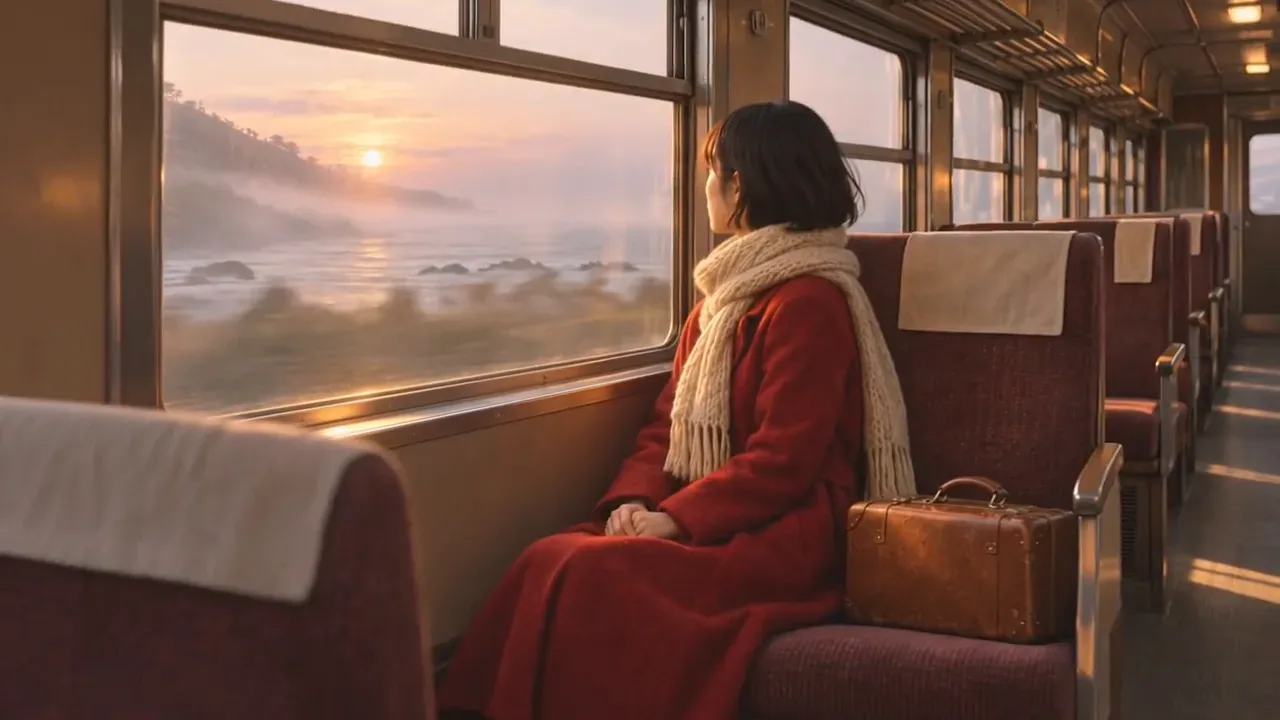
Verdict: Real, and chaining two 5-second First-and-Last clips locks an exact middle pose for the exact same credit cost. We started with three storyboard stills of the same traveler: waiting on a misty seaside platform at dawn (0 seconds), stepping onto the silver commuter train (5 seconds), and sitting by the sunlit carriage window as the train pulls away (10 seconds).

First, we gave Kling 4.0 only the outer bookends (@first_frame at 0 seconds and @last_frame at 10 seconds) for a single 10-second 1080p clip (11.28 credits). Second, to force the clip through the exact full-body boarding pose in the center frame at 5 seconds, we generated two 5-second 1080p clips (0 to 5 seconds and 5 to 10 seconds, 5.64 credits each, 11.28 credits total), placed them back to back on the ChatCut timeline, and exported the joined 10-second sequence.
What our frame and audio check showed: Both approaches bridged an exterior-to-interior transition cleanly with zero morphing on her red coat, knitted scarf, or leather suitcase. In the single 10-second take, Kling pushed in closer to a medium-back shot as she entered the train at 5.2 seconds before gliding down the aisle to land on @last_frame. In the two-clip chain, frame similarity against the center boarding still hit 0.963 SSIM at the end of Clip A and 0.986 SSIM at the start of Clip B, making the visual join at 5.04 seconds nearly invisible.
Rule to keep: Chaining two 5-second First-and-Last clips costs the exact same 11.28 credits as one 10-second clip and lets you reroll half the shot for 5.64 credits if one beat misses. Just add a 4-to-6-frame audio crossfade across the cut in ChatCut: each generation builds its own ambient sound bed, so a raw butt-splice leaves an audible step between Clip A’s brake hiss and Clip B’s door chime.
3. Reference Videos (@video_1): Does It Copy the Camera Move Cleanly?
Verdict: Real, and this is the single strongest reason to pick Kling 4.0 over 3.0. Kling 3.0 accepts up to 7 reference images and zero videos. Kling 4.0 accepts up to 10 images plus 5 reference videos (up to 30 seconds total) in one request. To test whether it separates motion from content, we fed it two white-backdrop felt character sheets (@image_1 and @image_2), a felt riverside village (@image_3), and a 10-second live-action sunrise runner clip (@video_1) whose camera tracks sideways, swings 180 degrees to the front, and rises at the end.
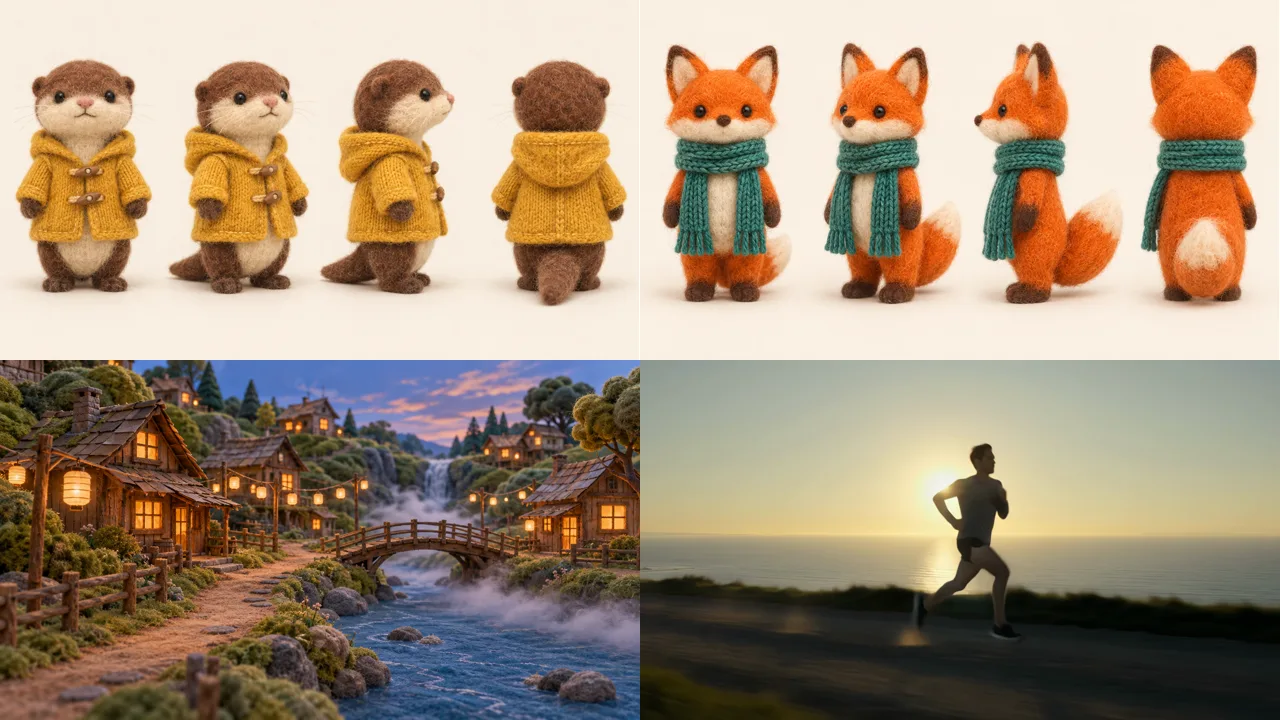
What our frame check showed: Every role stayed in its lane. From 0 to 2.6 seconds, the camera tracks sideways beside the two felt puppets while the fox raises a paw toward the lanterns; from 3.9 to 6.5 seconds, the camera swings smoothly around to a front-facing medium tracking shot just as it did in @video_1, and the otter waves its left paw at 6.5 seconds; from 7.7 to 9.0 seconds, the lens rises slightly to reveal the arched wooden bridge and waterfall behind them. The otter stayed on the left and the fox on the right for the entire clip, the white turnaround backgrounds never leaked in, and nothing from the human runner’s coastal road appeared.
What it adds to the bill: When you attach reference videos, Kling bills the output duration plus the longer of the output and total reference-video duration at a reduced omni-video rate (0.6768 credits/s at 1080p, 0.4512/s at 720p). Here, adding a 10.04-second reference video raised a 10-second 1080p generation from 11.28 to 13.57 credits (+20%).
4. Multi-Image Character Consistency in New Lighting
Verdict: Mostly real. Identity and wardrobe survived a jump from misty dawn to harsh midday sun, though our camera phrasing triggered an unrequested hard cut. Most character-reference demos use clean studio turnaround sheets. Real projects rarely have those, so we reused the three misty-dawn train stills from Test 2 (@image_1, @image_2, @image_3) and asked Kling 4.0 to place the same woman on a bright midday harbour quay at 720p.
What our frame check showed: Stripping out the old environment worked cleanly: there is no trace of train doors, tracks, or pink dawn mist, and her short black bob, red wool coat, cable-knit cream scarf, and brown suitcase match the source stills down to the collar fold and knit pattern. At 3.0 to 4.0 seconds she stops beside the blue-and-white fishing boats and sets the suitcase down on the stone quay.
Where it missed: At 5.04 seconds, instead of executing “then a slow push-in to a close-up” as one camera move, Kling hard-cut from the side medium shot to a front-facing close-up for the final three seconds. Because multi-shot mode is always active unless overridden, writing two shot sizes (“Medium tracking shot…, then a… close-up”) without “no cuts” invites Kling to edit between them.
5. Two-Speaker Dialogue and Lip Sync: Real or Marketing?
Verdict: Real. Kling 4.0 handled a three-line, two-person English exchange inside a single 10-second two-shot without scrambling words, blending the two voices, or moving the listener’s mouth during the speaker’s turn.
What our transcript and lip-crop check showed: Running ChatCut’s automatic speech transcription on the raw clip returned every word accurately and diarized two distinct speakers on the exact windows we wrote:
- 1.03 to 2.88 seconds (Customer): “Can I get a flat white, please?”
- 3.20 to 4.88 seconds (Barista): “Sure. Oat milk or regular?”
- 5.52 to 6.51 seconds (Customer): “Oat, thanks.”
Cropping both faces across nine timestamps confirmed that the barista kept a closed-lip smile throughout the customer’s opening question, rounded her lips clearly on “Oat” at 4.1 seconds while the customer waited silently, and closed her mouth again as he answered at 5.7 seconds. At 7.7 seconds he reaches forward to tap his phone on the counter terminal, and at 8.8 seconds the audio track plays a crisp card-reader beep over subtle cafe clatter, with no unrequested music. Two minor limits: both faces are in side profile across the counter (where lip shapes are softer than in a front close-up), and the espresso machine behind them bears a garbled badge reading “ilo Atsvo”.
6. Native Stereo Audio and Visual Physics
Verdict: Real. Kling’s User Guide highlights two-channel stereo as a new 4.0 specification. We tested both visual physics and spatial audio on a high-contrast volcanic-coast aerial with zero dialogue.
What our frame and waveform check showed: Visually, the camera skims low over fractured black basalt with glowing fissures for the first four seconds, then rises smoothly with no cuts to reveal a winding molten river meeting the dark ocean under stars, holding strictly to the molten-orange and deep-blue palette (the steam plume rises on the distant shoreline rather than in the immediate foreground). On the audio stream, subtracting the right channel from the left (L minus R) yielded an RMS difference of -27.8 dB (compared with -inf dB bit-identical dual-mono on our Kling 3.0 control clip), with a continuous sub-200 Hz rumble and a sharp broadband crack-and-steam burst at 2.2 seconds right as the widest fissure opens beneath the lens.
7. Native 21:9 Ultrawide and Timed Multi-Shot Cuts
Verdict: Real, and already live despite third-party reviews calling 21:9 “coming soon”. Several early articles read Kling’s October press release in future tense and listed 21:9 ultrawide as unshipped. Selecting 21:9 at 1080p in ChatCut today returns a native 2200 × 940 video with no letterboxing, for the same 11.28 credits as a 16:9 clip. We paired 21:9 with an explicit three-shot car commercial brief to test whether Kling hits exact cut points while keeping an unbadged vehicle identical across angles.
What our frame check showed: Scene-cut detection landed on 3.000 seconds and 6.000 seconds to the frame. Shot 1 glides over beaded water on dark graphite paint until the split LED headlight ignites at 2.58 seconds; Shot 2 drops to wheel height on wet asphalt with spinning spokes and road spray; Shot 3 sweeps down from a high coastal cliff aerial into a low three-quarter hero pass. Across all three shots, the coupe keeps the same dark graphite finish, split headlight signature, and blank black front plate with zero invented logos, paired with our widest stereo field (-21.6 dB L-R difference) as the engine note climbs through the gears.
8. Same Prompt: Kling 4.0 vs Kling 4.0 Flash vs Kling 3.0
Verdict: Kling 4.0 wins on color discipline and camera composure; 4.0 Flash is a bargain 720p draft tool (and supports First and Last Frames in ChatCut); 3.0 remains fine for simple, lower-cost 1080p shots that do not need complex camera blocking. We sent the identical 10-second wildlife prompt to all three models.
What separated the three renders:
- Kling 4.0 (11.28 credits at 1080p): Nailed both the look and the lens behavior. Deep teal-blue snow sits under a narrow orange horizon band, breath vapor catches the backlight, and the long lens tracks smoothly as the wolf runs toward and past the right edge of the frame without losing focus. Stereo audio (-28.9 dB L-R difference).
- Kling 4.0 Flash (4.52 credits at 720p): Kept the blue-hour palette and genuine stereo sound (-28.5 dB L-R difference) for 40% less than Kling 4.0 at 720p, and obeyed “toward and past the camera”. However, between 5.2 and 6.5 seconds the wolf ran almost through the lens, filling the frame with out-of-focus fur for just over a second before the camera whipped 180 degrees to watch it bound away across the snow.
- Kling 3.0 (8.07 credits at 1080p): Delivered sharp 1080p fur and snow spray for 28% fewer credits than Kling 4.0 at 1080p, but drifted into warm golden-hour sunlight, never completed “and past the camera” (the wolf only runs straight toward the lens), and rendered dual-mono sound (-inf dB L-R difference).
Bonus check on Flash frame inputs: Kling’s official FAQ states that 4.0 Flash “does not currently support start-and-last frames.” In ChatCut, we tested passing the Test 2 platform (@first_frame) and train-door (@last_frame) stills to Kling 4.0 Flash for a 5-second 720p clip. It succeeded in 56 seconds for 2.26 credits (less than half of Clip A’s 5.64 credits at 1080p) and hit both keyframes cleanly (0.971 and 0.955 SSIM):
Four Failure Modes We Hit (and How to Fix Them)
| Failure mode we saw | Why it happened | Practical fix |
|---|---|---|
| Unrequested hard cut mid-clip (Test 4 cut at 5.04s) | Kling 4.0 enables smart multi-shot cutting by default; naming two shot sizes (“medium shot, then close-up”) reads like an edit | Start the prompt with “One continuous shot with no cuts” whenever you want a push-in or arc instead of a cut |
| Garbled pseudo-text on carts and machines (Tests 1 and 5) | “No text, no readable signs” stops floating titles, not signage baked into street stalls or espresso machines | Frame tighter, ask for plain unlabelled surfaces (“blank wooden cart with no signboard”), or mask/crop in the editor |
| Audible ambience step between chained clips (Test 2 at 5.04s) | Each First-and-Last clip generates an independent stereo sound bed | Overlap or add a 4-to-6-frame audio crossfade at the cut on the ChatCut timeline |
| Subject brushes too close to the lens on Flash (Test 8 at 5.2–6.5s) | Flash tracks fast foreground passes less conservatively than full Kling 4.0 | Specify minimum distance (“passes three metres to the right of the camera”) or promote the approved prompt to full Kling 4.0 |
For prompt structure across product shots, camera moves, and dialogue, see our Kling AI prompts guide.
How to Use Kling 4.0 in ChatCut Without Burning Credits
Because Kling charges per generated second and has no free re-render upgrade from draft to final, the cheapest workflow is to test blocking at 720p on Flash and pay for 1080p on Kling 4.0 only once:
- Open Video Gen and pick Kling 4.0 Flash first. Switch the ChatCut AI composer to Video Gen, choose Kling 4.0 Flash, and run a 5-to-10-second 720p test (2.26 to 4.52 credits) to check framing, character locks, or First-and-Last transitions.
- Name every visual attachment in the prompt. Under Video settings, attach your First Frame, Last Frame, References (
@image_1to@image_10), or motion clips (@video_1to@video_5), and state explicitly what each supplies and what to ignore (such as “take only the camera move from@video_1, not its person or background”). - Write camera, exclusions, and sound into the prompt. Kling has no separate camera-control slider, negative-prompt box, or audio mute toggle in ChatCut. State whether you want cuts or one continuous take, name the ambient sounds or quoted dialogue, and write “no music, no subtitles” when you want clean dialogue or foley.
- Switch to Kling 4.0 for the hero render and cut on the timeline. Re-run the winning prompt on Kling 4.0 when you need 1080p, 21:9, or 21 to 30 seconds, then drag the clip from My Assets onto the timeline to trim heads and tails, smooth audio joins, or add captions.
Kling 4.0 vs Kling 4.0 Flash vs Kling 3.0: Specs and Real Costs
Sources online disagree on several Kling 3.0 specifications because Kuaishou shipped Video 3.0 at 720p and 1080p on February 6, 2026 and added native 4K to the 3.0 series later on April 23, 2026. The table below pairs verified official model specs with what you can select and what you actually pay inside ChatCut’s model capability matrix and credits policy as of November 15, 2026.
| Specification | Kling 3.0 | Kling 4.0 | Kling 4.0 Flash |
|---|---|---|---|
| Official launch date | Feb 6, 2026 (4K added Apr 23, 2026) | Oct 15, 2026 | Early preview late Sep; wide rollout Nov 2026 |
| Single-clip duration | 3 to 15 seconds | 3 to 30 seconds | 3 to 20 seconds |
| Resolution in ChatCut | 720p, 1080p (24 fps) | 720p, 1080p (24 fps) | 720p only (24 fps) |
| Official max resolution | Up to 4K on kling.ai | Up to 4K listed (10-bit HDR coming soon) | 720p (8-bit SDR) |
| Aspect ratios in ChatCut | 16:9, 9:16, 1:1 (or match frame) | 21:9, 16:9, 9:16, 1:1 | 21:9, 16:9, 9:16, 1:1 |
| Image & frame inputs (ChatCut) | First, Last, image refs: up to 7 images total | First, Last, image refs: up to 10 images total | First, Last, image refs: up to 10 images total |
Reference videos (@video_1) | None | Up to 5 videos (3–30s each, 30s total) | Up to 5 videos (3–20s each, 20s total) |
| Native audio | Always on (dual-mono in our test) | Always on (true 2-channel stereo) | Always on (true 2-channel stereo) |
| Prompt limit in ChatCut | 2,500 characters | 26,000 English chars (11,000 other languages; 8,000 tokens upstream) | 26,000 English chars (11,000 other languages) |
| 10s clip in ChatCut (720p) | 6.05 credits (5.38 with image refs) | 7.54 credits | 4.52 credits |
| 10s clip in ChatCut (1080p) | 8.07 credits (6.72 with image refs) | 11.28 credits (13.57 with a 10s ref video) | Not available |
Across our 6 newly generated clips in this review (two 5-second 1080p clips, one 8-second 720p clip, one 10-second 720p dialogue clip, one 10-second 720p Flash clip, and one 5-second 720p Flash clip), our total ChatCut bill was 31.63 credits (about $5.55 to $7.91 across ChatCut’s 100-to-2,000-credit monthly and annual plans, where the 100-credit monthly plan starts at $25).
Is Kling 4.0 Worth It? Five Creator Profiles
- Commercial and product-ad creators: Upgrade to Kling 4.0. Timed multi-shot prompts hit exact 3-second cuts (Test 7), native 21:9 saves cropping vertical resolution away, and
@video_1lets you copy a proven camera move onto your product or mascot. If you are weighing Kling against ByteDance’s flagship for ad work, see our 8-test head-to-head in Seedance 2.5 vs Kling 4.0, where Kling cost 42% as much at 1080p (11.28 vs 26.89 credits for 10 seconds) and followed camera orbits more literally. - Short-drama and narrative filmmakers: Upgrade to Kling 4.0 + Flash. Up to 10 image slots, 26,000-character prompts, 30-second one-takes, and chained 5-second First-and-Last shots make scene blocking noticeably easier than 3.0’s 15-second, 2,500-character ceiling. Draft blocking on Flash first.
- Dialogue and explainer creators: Use Kling 4.0. Two-person turn-taking with silent listening expressions and synced prop foley worked cleanly in a single take (Test 5). Keep dialogue shots to static or slow cameras and 8 to 10 seconds per clip.
- High-volume 9:16 social teams: Make Kling 4.0 Flash your default. If your output lives on phones where 720p holds up behind captions, 4.52 credits for 10 seconds with stereo sound, reference videos, and First-and-Last frames beats Kling 3.0 on both price (4.52 vs 6.05 credits at 720p) and control.
- Budget 1080p B-roll users with simple text or still prompts: Keep Kling 3.0 in rotation. When you only need a 5-to-10-second 1080p atmospheric insert with no reference video and you plan to mute the audio under music anyway, Kling 3.0 with an image reference drops to 6.72 credits for 10 seconds (8.07 text-only) versus 11.28 on Kling 4.0.