Models

How We Made a 35-Second Seedance 2.5 Short Film: Every Prompt, Shot and Credit

ChatCut Team
15 min read
How We Made a 35-Second Seedance 2.5 Short Film: Every Prompt, Shot and Credit
Contents
  1. Key Takeaways
  2. The plan: five shots, one prop
  3. Step 1: Make the character, prop and location references
  4. Step 2: Write one reference block and reuse it
  5. Step 3: Generate the five shots
  6. Step 4: Cut it together in ChatCut
  7. What it cost, and what 1080p would cost
  8. A checklist for your own Seedance short film

We made a 35-second film with Seedance 2.5 from three reference images and five shot prompts, cut it together on the ChatCut timeline, and spent 17.40 credits doing it. The same man, the same prop and the same room carry through all five shots. Two shots have mistakes we left in so you can see them. Below is the finished film, then every input, every prompt and the edit.

Demo
A Corner of Color. Five Seedance 2.5 shots, 480p drafts, cut in ChatCut. 35 seconds; turn the sound on.

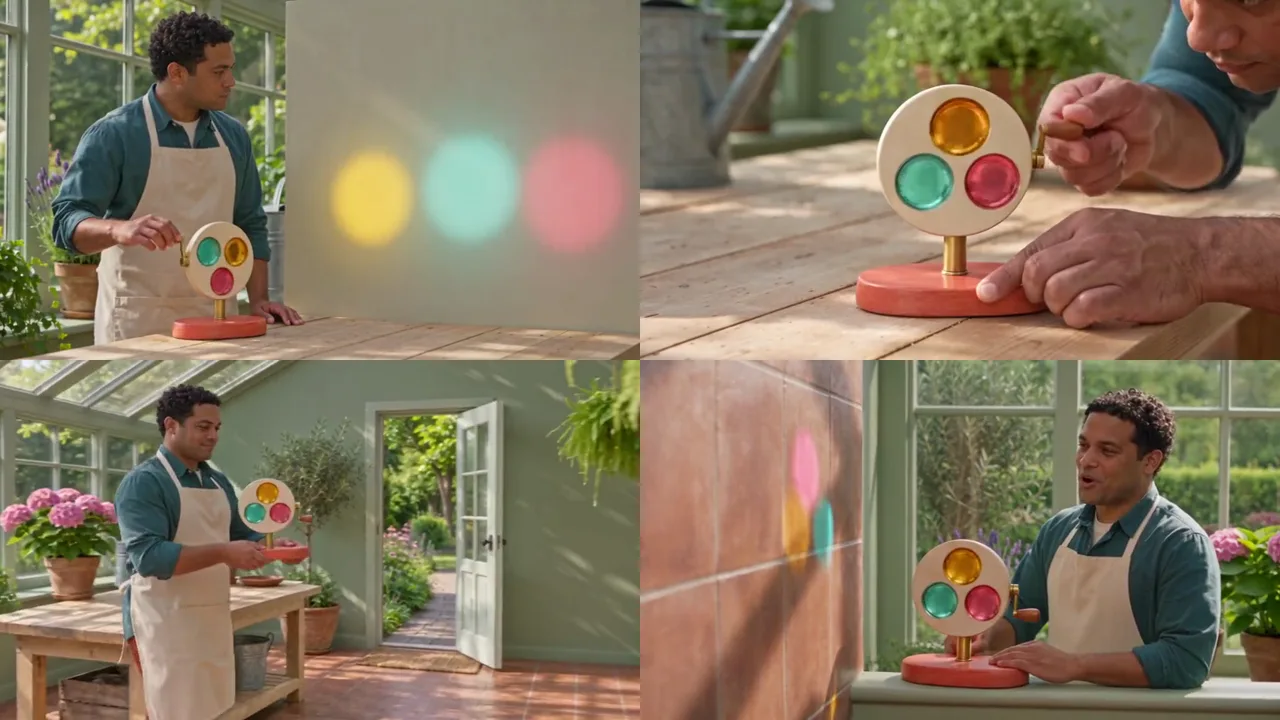
The film is small on purpose. Ivo finds a pale corner in a sunny conservatory, tests a little color wheel made of glass windows, carries it to the window and turns its crank until amber, aqua and rose light falls on the wall. Five shots, one character, one prop, one room: enough to test whether Seedance keeps things consistent from shot to shot.

Key Takeaways

  • Make the references first. A character sheet, a prop sheet and a location still, all generated before the first shot, did most of the consistency work.
  • Reuse one reference block word for word. Every shot prompt opens with the same three sentences saying what @Image1, @Image2 and @Image3 fix.
  • Give each shot one job. Look, test, carry, project, react: one action per prompt, 6 to 8 seconds each.
  • Expect continuity slips and plan the edit around them. The wheel didn’t spin in shot 2, and the wall changed material in shot 5.
  • Draft the whole film at 480p. All five shots cost 16.95 credits as drafts; at 1080p they would cost 94.29.

The plan: five shots, one prop

ShotLengthWhat happensWhat it tests
1. A pale corner6 sIvo at the bench looks from the wheel to an empty wallCharacter and room from references, a spoken line
2. Turn the three colors7 sClose-up: he turns the crank, the glass windows pass the lensProp detail and a hand operating it
3. Carry the color7 sHe carries the wheel to the window; a fern hides his face for a momentIdentity surviving an occlusion
4. Let the sun through7 sHe sets it on the sill and cranks; colored light lands on the wallCause and effect between a hand and the light
5. A corner of color8 sThe light on the wall, then Ivo: “That looks like home.”Ending the action, a final line, holding a frame

We followed the structure of the best-ranked breakdowns, such as Higgsfield’s 4K short film breakdown: build the assets, then write each scene against them. What those breakdowns rarely give is what each shot cost and what went wrong in it, so we added both.

Step 1: Make the character, prop and location references

Three images, each generated once with GPT Image 2.6 in ChatCut at 1K, 0.15 credits each. Each one has a job: who, what and where.

Three reference images: a character sheet of Ivo, a man with short black curls in a teal overshirt and cream apron, shown front, side and full body; a prop sheet of a color wheel with a coral base, brass axle and three glass windows in amber, aqua and rose, shown front, side and top; and a sunny conservatory with a wooden workbench and an open garden door.
@Image1 character, @Image2 prop, @Image3 location. GPT Image 2.6 in ChatCut.

@Image1, the character sheet:

Try this promptOpen in ChatCut
Photographic character sheet of a fictional adult man named Ivo, 36, medium-brown skin, round face, cropped black curls, teal overshirt, cream canvas apron, rust trousers, plain white shoes. Front portrait, side portrait and full body on a light gray backdrop, soft daylight, no insignia, no text.

@Image2, the prop sheet:

Try this promptOpen in ChatCut
Photographic prop sheet of an invented tabletop sunlight color wheel: a coral oval wooden base, one short brass upright axle holding a single round cream wheel with three inset translucent glass windows colored amber, aqua and rose, and one small wooden crank on the right. Front, side and overhead views with consistent dimensions, plain light backdrop, no writing.

@Image3, the location:

Try this promptOpen in ChatCut
Photograph, three-quarter view of a sunny communal conservatory: large windows on screen left, one pale wooden workbench in the center, an open garden door at the far right, sage walls, terracotta floor, clear walking space, no people, no signs.

Why sheets and not single photos: three views of the same face and the same prop give Seedance more to match when the camera angle changes. “Consistent dimensions” and “no writing” stop the prop from growing labels or changing size between views.

Step 2: Write one reference block and reuse it

Every shot prompt starts with the same four sentences, copied exactly:

Try this promptOpen in ChatCut
References: @Image1 fixes Ivo, his face, teal overshirt and cream apron. @Image2 fixes the sunlight color wheel: coral base, one brass axle, one cream wheel containing three glass windows and a wooden crank. @Image3 fixes the conservatory and window light entering from screen left. Photographic daylight with gentle warm colors.

and ends with the same lock: “Keep the wheel circular and its three glass windows unchanged. No branding or writing.” Only the middle, the action of that shot and its sound, changes. Repeating the block is boring to write and exactly what makes the shots match.

Step 3: Generate the five shots

Each shot was generated once with Seedance 2.5 in ChatCut on November 13, 2026, at 480p, 16:9, with the three images as references. Under each one is what worked and what didn’t.

Shot 1: A pale corner

Try this promptOpen in ChatCut
References: @Image1 fixes Ivo, his face, teal overshirt and cream apron. @Image2 fixes the sunlight color wheel: coral base, one brass axle, one cream wheel containing three glass windows and a wooden crank. @Image3 fixes the conservatory and window light entering from screen left. Photographic daylight with gentle warm colors. A waist-high tracking view finds Ivo at the bench looking from the color wheel to a pale wall beside the garden door. He rests both hands beside the base without lifting it. The wheel is stationary. Keep the wheel circular and its three glass windows unchanged. No branding or writing. Audio: quiet room air, soft shoe steps; Ivo says, "A little color for this corner.". No subtitles.
Demo
Shot 1. 6 s, 480p draft, 2.91 credits.

Worked: the room matches @Image3 (bench, open garden door, sage walls) and Ivo matches his sheet. We transcribed the line and it came back exactly: “A little color for this corner.” Didn’t: the shot opens on an empty bench and Ivo walks in, rather than being found at it, which costs about a second of screen time.

Shot 2: Turn the three colors

Try this promptOpen in ChatCut
References: @Image1 fixes Ivo, his face, teal overshirt and cream apron. @Image2 fixes the sunlight color wheel: coral base, one brass axle, one cream wheel containing three glass windows and a wooden crank. @Image3 fixes the conservatory and window light entering from screen left. Photographic daylight with gentle warm colors. Macro view of the color wheel on the bench. Ivo steadies the base with his left hand and turns the wooden crank slowly with his right. Amber, aqua and rose glass windows each pass the lens once. He stops the crank, then takes the base in both hands. Keep the wheel circular and its three glass windows unchanged. No branding or writing. Audio: a faint wooden crank creak, three light mechanical ticks, quiet room ambience, no speech. No subtitles.
Demo
Shot 2. 7 s, 480p draft, 3.39 credits.

Worked: the prop is the prop from the sheet, down to the coral base, brass axle and the three colors in the same order. Didn’t: his hand works the crank, but the wheel itself doesn’t turn; the windows never move. The fix would be to describe the result, not just the action: “the wheel rotates a full turn as he cranks”.

Shot 3: Carry the color

Try this promptOpen in ChatCut
References: @Image1 fixes Ivo, his face, teal overshirt and cream apron. @Image2 fixes the sunlight color wheel: coral base, one brass axle, one cream wheel containing three glass windows and a wooden crank. @Image3 fixes the conservatory and window light entering from screen left. Photographic daylight with gentle warm colors. One side tracking shot follows Ivo carrying the stationary color wheel from bench to the window beside the garden door. A hanging fern briefly obscures his face, then reveals the same face and apron. He stops before the broad sill with both hands supporting the base. Keep the wheel circular and its three glass windows unchanged. No branding or writing. Audio: terracotta footsteps, a small wooden rattle, garden birds; a simple original four-note acoustic theme begins. No subtitles.
Demo
Shot 3. 7 s, 480p draft, 3.39 credits.

Worked: the hardest consistency test, and it held. The fern passes in front of his face and the same face comes out the other side, still in the same apron, still carrying the same wheel by its base. Writing the occlusion into the prompt, “then reveals the same face”, is what keeps Seedance from swapping him out.

Shot 4: Let the sun through

Try this promptOpen in ChatCut
References: @Image1 fixes Ivo, his face, teal overshirt and cream apron. @Image2 fixes the sunlight color wheel: coral base, one brass axle, one cream wheel containing three glass windows and a wooden crank. @Image3 fixes the conservatory and window light entering from screen left. Photographic daylight with gentle warm colors. Medium view beside the window. Ivo sets the coral base on the broad sill and releases his left hand. With his right hand he rotates the crank slowly, sending sunlight through the colored windows onto the pale wall opposite. The three colored patches move only while he turns the crank. End with his right hand still on the crank. Keep the wheel circular and its three glass windows unchanged. No branding or writing. Audio: wooden base contact, soft crank creak, faint garden ambience; the instrumental theme stays quiet. No subtitles.
Demo
Shot 4. 7 s, 480p draft, 3.39 credits.

Worked: the payoff. The wall starts plain, and as he works the crank the amber, aqua and rose patches appear on it one after another, in the same colors as the windows. Tying the light to the hand (“move only while he turns the crank”) gave the shot cause and effect instead of light that just appears.

Shot 5: A corner of color

Try this promptOpen in ChatCut
References: @Image1 fixes Ivo, his face, teal overshirt and cream apron. @Image2 fixes the sunlight color wheel: coral base, one brass axle, one cream wheel containing three glass windows and a wooden crank. @Image3 fixes the conservatory and window light entering from screen left. Photographic daylight with gentle warm colors. Begin on the moving amber, aqua and rose patches on the wall, then ease sideways to include Ivo and the color wheel at the window. He stops turning; the colored patches stop. Ivo says, "That looks like home," and releases the crank. Hold the final composition for two seconds, leaving the lower right clear. Keep the wheel circular and its three glass windows unchanged. No branding or writing. Audio: soft English from Ivo, garden birds and the last crank tick; the acoustic theme resolves gently. No subtitles.
Demo
Shot 5. 8 s, 480p draft, 3.87 credits.

Worked: the move from the light to Ivo, the stop, the line (“That looks like home.” came back exactly) and the held ending. Didn’t: the wall the light falls on is now terracotta tile, not the pale wall of shot 4. Seedance kept the man and the prop but not the wall, because the wall was only in the prompt, not in a reference. For a release we would regenerate this shot with “the same pale plaster wall as before”, or add a still of that wall as a fourth reference.

Step 4: Cut it together in ChatCut

The five clips landed in My Assets. On a 1920 × 1080, 30 fps timeline we:

  1. Placed the shots in order on one track: 6, 7, 7, 7 and 8 seconds, 35 seconds in all.
  2. Trimmed the few spare frames at the end of each clip so every cut lands on a whole second.
  3. Added a 0.4-second fade in on the first shot and a 0.8-second fade out on the last, on picture and sound.
  4. Kept each shot’s own generated sound: room tone, footsteps, the crank, birds and the two lines.
  5. Exported at 480p, the drafts’ native size.

What we didn’t do, and you might: three of the prompts ask for “an acoustic theme”, but each shot generates its own audio, so that is three separate pieces of music. For a real release, mute the music in the clips and lay one track across the whole cut. A title card in the held last two seconds would also go where the prompt left the lower right clear.

Generate the shots and cut the film in the same ChatCut project.Download DesktopDownload for macOSDownload for WindowsDownload ChatCut Desktop

What it cost, and what 1080p would cost

ItemAs made (480p drafts)Finished at 1080p
Three reference images0.450.45
Shot 1, 6 s2.9116.18
Shots 2–4, 7 s each3 × 3.393 × 18.86
Shot 5, 8 s3.8721.53
Total17.40 credits94.74 credits, plus the drafts

At ChatCut’s plan prices of roughly $0.18 to $0.25 per credit, the draft film cost about $3 to $4.35. Finishing all five shots at 1080p from their drafts adds 94.29 credits, about $17 to $24, and must be done within 7 days of drafting. We’d regenerate shots 2 and 5 first, at 480p, and only finish what we keep. The Seedance 2.5 price guide explains the draft-to-final route.

A checklist for your own Seedance short film

  1. Write the shot list first: one action per shot, 6 to 8 seconds, and what each shot tests.
  2. Make a reference for everything that must not change: the character, every prop, and every surface the story depends on (our wall should have had one).
  3. Write one reference block and paste it into every prompt unchanged.
  4. Describe results, not just actions: “the wheel rotates”, “the light stops”, “reveals the same face”.
  5. Draft every shot at 480p, review them in order on the timeline, and redo the weak ones before you finish anything.
  6. Plan the sound for the cut, not the clip: dialogue and effects from the shots, one music track across the edit.

For more prompts written this way, see our 22 tested Seedance 2.5 prompts; for the basics step by step, see how to use Seedance; and for how Seedance compares with another model on the same prompts, see Seedance 2.5 vs Kling 4.0.
Frequently asked questions

How do you keep a character consistent across Seedance shots?
Generate a character sheet with front, side and full-body views, attach it to every shot as a reference image, and open every prompt with the same sentence saying what that image fixes. In our film this kept Ivo's face and clothes the same across five shots, including through a moment where a plant hides his face.
How long can a Seedance short film be?
As long as you like: each Seedance 2.5 clip is 4 to 30 seconds, and a film is several clips cut together. Shorter shots of 6 to 8 seconds with one action each were easier to control than long ones.
How much does a Seedance short film cost?
Our 35-second, five-shot film cost 17.40 credits in ChatCut as 480p drafts, including the reference images. Finishing every shot at 1080p would add 94.29 credits. At ChatCut's plan prices that is roughly $3 to $4 for the drafts and $17 to $24 more for the 1080p finals.
Can Seedance generate dialogue for a short film?
Yes. Seedance 2.5 generates speech with the clip when you quote the line and name the speaker. Both lines in our film came back word for word when we transcribed them.
Do I need a separate editor to assemble the film?
Not in ChatCut: the generated clips go to My Assets in the same project, so you can drag them to the timeline, trim, add fades, music and captions, and export without leaving the app.

Checking your footage...

Less editing. More creating.

Download ChatCut Desktop free and make your first video today.

Download Desktop Download for macOS Download for Windows Try it for free