Use Seedance 2.5 Flash to try many ideas fast, a 480p draft to lock one shot cheaply, Seedance 2.5 at 1080p to deliver it, and 4K only when the picture will be shown big. Flash and the draft are both cheap 480p or 720p clips, but they work differently: a draft can become the 1080p final of the same shot, while a Flash clip can’t.
Not all four are available everywhere yet. As of November 13, 2026, the Seedance 2.5 draft and 1080p work in ChatCut, Seedance 2.5 Flash opens on ByteDance’s API on November 15, and Seedance 2.5 4K, limited to selected enterprise customers on ByteDance’s API, is in ChatCut as a 4K setting on Seedance 2.5. Seedance 2.0 also renders native 4K. This guide compares all of them and shows what we got when we used the draft-to-final route on real shoots.
Key Takeaways
- Flash is a separate, faster model. ByteDance says it is nearly twice as fast and about 34% cheaper at 720p than Seedance 2.5, with fewer reference slots and no 1080p.
- A draft is the full model at 480p. It costs 4.84 credits for 10 seconds in ChatCut and can be turned into the matching 1080p or 4K final within 7 days.
- The final keeps the shot, not every pixel. On our shoots, composition, motion and timing carried over every time; small details such as a castle’s towers were sometimes redrawn.
- Seedance 2.5 4K is in ChatCut; on the API it is enterprise-only. It adds 10-bit colour and a draft-to-4K route; 10 seconds cost 43.29 credits, about 1.6 times the 1080p price. Seedance 2.0 also generates native 4K, for clips up to 15 seconds.
- Draft first when you expect to reject takes. It saved 26% on our 4K page shoot, where we kept 5 of 9 ideas.
Which Seedance 2.5 option should you pick?
| Seedance 2.5 Flash | Seedance 2.5 draft (480p) | Seedance 2.5 at 1080p | Seedance 2.5 4K | Seedance 2.0 at 4K | |
|---|---|---|---|---|---|
| Use it for | Trying many ideas | Locking one shot cheaply | Delivering the shot | Big screens, ads and film | Native 4K up to 15 s |
| Resolution | 480p, 720p | 480p | 1080p | 4K, 10-bit | 4K, 10-bit HEVC |
| Length per clip | Up to 30 s | 4–30 s | 4–30 s | 4–30 s | 4–15 s |
| References | 10 images, 5 videos, 5 audio | 30 images, 10 videos, 10 audio | Same as draft | Same as draft | 9 images, 3 videos, 3 audio |
| 10 s in ChatCut | Not in ChatCut yet | 4.84 credits | 26.89 credits | 43.29 credits | 36.31 credits |
| Can it become a higher resolution? | No, generate again on 2.5 | Yes, the matching 1080p or 4K final | It is the final | Drafts finish at 4K | No |
| Availability, Nov 13, 2026 | API opens Nov 15 | ChatCut, API | ChatCut, API | ChatCut; API for selected enterprises | ChatCut, API |
Sources: ByteDance’s Flash announcement, the Seedance 2.5 tutorial on ModelArk, the Seedance 2.5 4K announcement and ChatCut’s credit quotes, all checked November 13, 2026. Our Seedance 2.5 price guide has every duration and resolution.
When is Flash the right place to start?
When you have several ideas and want to see them all before choosing one. ByteDance released Seedance 2.5 Flash on November 12, 2026 as a faster, cheaper version of Seedance 2.5 for exploring: nearly twice the generation speed and about 34% lower cost for 720p text-to-video and image-to-video. It still makes clips up to 30 seconds with synchronised sound.
Good uses for Flash:
- Hooks and variations. Four openings for the same ad, or the same scene in four styles, to compare side by side.
- Storyboards in motion. A rough version of every shot in a sequence before you spend on any of them.
- Social clips that ship at 720p. If the destination is a phone feed, a Flash clip can be the finished video.
What Flash gives up: fewer references (10 images, 5 videos and 5 audio clips against 30, 10 and 10), and no route to a higher resolution. A Flash clip you like cannot be turned into a 1080p version of itself; to get one, you run the prompt again on Seedance 2.5, and the new clip will be a different take.
Flash is not in ChatCut yet. Its API opens on November 15, 2026; we’ll add our own speed and quality tests here once we can run it.
When is a 480p draft better than Flash?
When you already know the shot you want and need the 1080p version to match it. In ChatCut, every Seedance 2.5 clip you generate at 480p is a draft. Turn it into a final within 7 days and Seedance renders the same shot at 1080p, reusing the draft’s prompt, references, duration, aspect ratio and audio.
This is what that looks like. The left half of the frame is the 480p draft; the right half is the 1080p final made from it, at the same moment.
On the draft-to-final pairs we made for our model pages, the same things happened every time:
- The shot carries over. Composition, camera move, timing and the action line up between draft and final.
- Detail improves. Water spray, manes, clouds and textures that are soft at 480p come back sharp at 1080p.
- Some details are re-rendered. In the clip above, the castle’s towers changed shape. If a logo, a face or a line of text must be exact, judge it in the final, not the draft.
In our tests, Seedance 2.5 finals came back as 1920 × 1080, 24 fps, 10-bit HEVC files, while the drafts were 854 × 480 H.264.
Is 4K worth it for this shot?
Only when the video will be watched large, cropped into or colour-graded hard. We generated the same prompts at native 4K and 1080p with Seedance 2.0 and found the 4K detail clear at 100% but hard to spot at normal viewing size. The most useful thing 4K gave us was room to crop: a quarter of a 4K frame is a full-HD close-up. Our native 4K guide has the crops, a 10-bit grading test and the costs.
There are two native 4K routes:
- Seedance 2.5 4K is ByteDance’s model trained specifically for 4K. According to BytePlus, it renders faces, small expressions and texture more fully, uses 10-bit colour, keeps more of the quality of reference images and video, makes small text on posters and packaging easier to read, and lets you draft at 480p before the 4K render. On ByteDance’s API it is limited to selected enterprise customers, with no public price; in ChatCut you pick it as a 4K resolution on Seedance 2.5.
- Seedance 2.0 at 4K is available now, in ChatCut and on the API: 4 to 15 seconds, 10-bit HEVC, 36.31 credits for 10 seconds. It has no draft route, so test the prompt at a lower resolution first and expect the 4K render to be a new take.
Seedance 2.5 vs Seedance 2.0: what changed?
If you are choosing between the two generations rather than between the 2.5 variants:
| Seedance 2.5 | Seedance 2.0 | |
|---|---|---|
| Released | July 31, 2026 | February 12, 2026 |
| Clip length | 4–30 s | 4–15 s |
| References | 30 images, 10 videos, 10 audio | 9 images, 3 videos, 3 audio |
| Highest resolution | 4K (in ChatCut; enterprise-only on ByteDance’s API) | 4K |
| Drafts | 480p drafts become 1080p or 4K finals | No |
| Edit or extend a source video | Yes, as Edit and Extend modes | Through video references |
| 10 s at 1080p in ChatCut | 26.89 credits | 17.81 credits |
| Cheaper variants | Flash (from Nov 15, API) | Fast and mini, up to 720p |
Seedance 2.5 is the better default for longer shots, many references and editing existing clips. Seedance 2.0 remains useful for cheaper native 4K up to 15 seconds and for cheap tests with Fast or mini. See the Seedance 2.5 and Seedance 2.0 pages for what each does in ChatCut.
A workflow that keeps the bill down
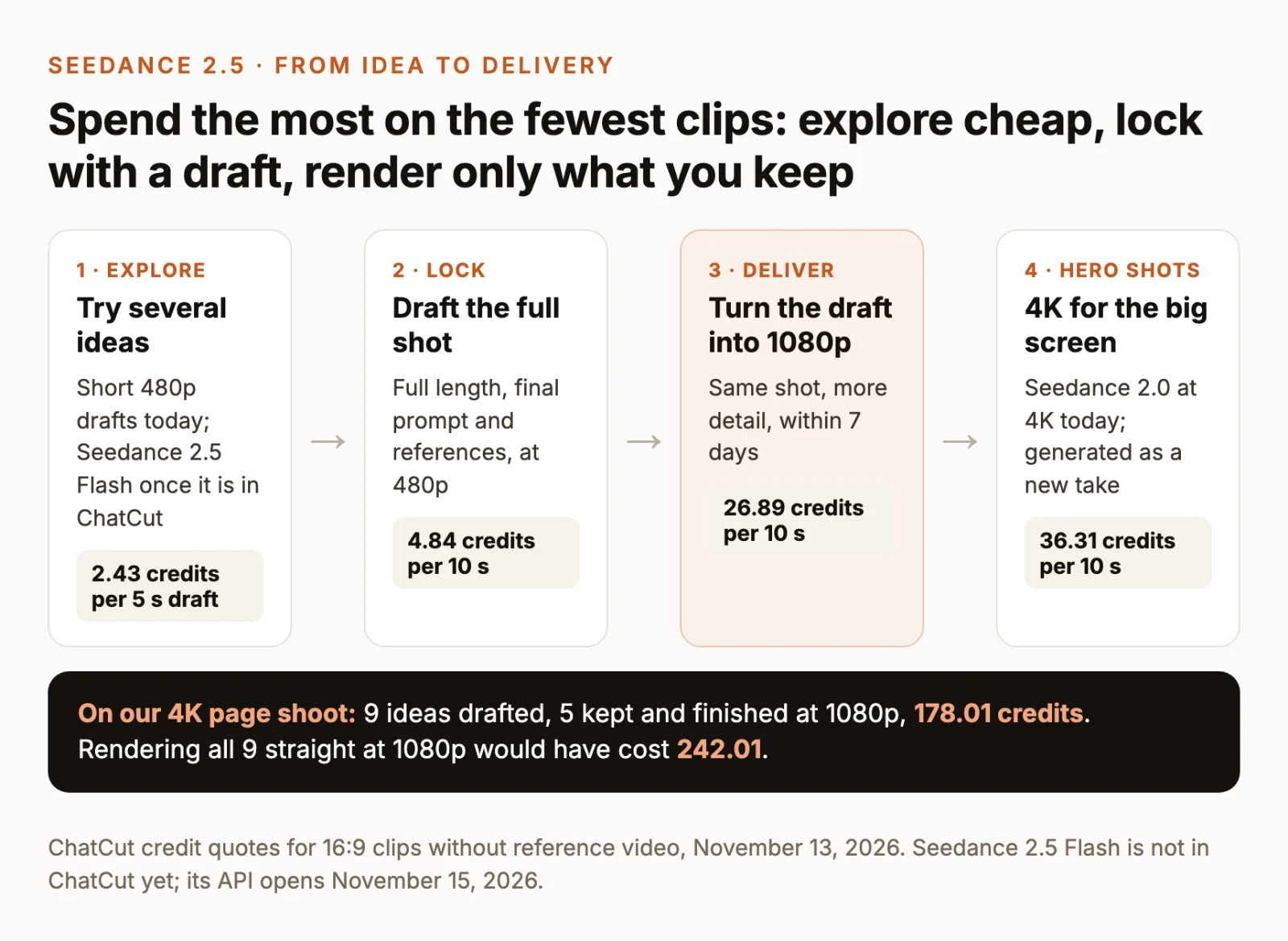
- Explore. Try each idea as a short 480p draft. A 5-second draft costs 2.43 credits. Once Flash is in ChatCut, it fits here too.
- Lock. Draft the shot you chose at full length with the final prompt and references.
- Deliver. Turn the draft into its 1080p final. Check faces, text and small details in the final.
- Hero shots. For the few shots that will be seen on a big screen or cropped, turn the draft into a 4K final instead, or generate a 4K version with Seedance 2.0 for clips up to 15 seconds.
Drafting adds 4.84 credits to each 26.89-credit final, so it only pays when you throw takes away. On our Flash page shoot we kept 4 of 5 ideas and saved 2%; on our 4K page shoot we kept 5 of 9 and saved 26%. If you already know a shot works, generate it at 1080p directly.
What doesn’t carry over?
- From Flash to the full model: nothing is linked. Re-running a Flash prompt on Seedance 2.5 gives you a new take.
- From a draft to its final: the prompt, references, duration, aspect ratio and audio carry over automatically. To change any of them, make a new draft.
- Draft lifetime: in ChatCut, a draft must be turned into a final within 7 days. ByteDance’s own API now keeps newer drafts for 14 days, but ChatCut’s limit is 7.
- Draft resolution: in ChatCut, a draft finishes at 1080p or 4K. You pick the resolution when you turn it into the final.
- Exactness: the final is close to the draft, not frame-identical. Small details may be redrawn.