Native 4K AI video is footage the model generates at 3840 × 2160, rather than footage made at a lower resolution and enlarged afterwards. It is worth paying for when the video will be shown large, cropped into or colour-graded hard. For a video watched on phones and laptops, 1080p looks almost the same and costs about half as much.
To check that, we generated two shots with Seedance 2.0 in ChatCut on November 13, 2026, once at native 4K and once at 1080p, and put 100% crops, a heavy colour grade and the bill side by side. Below are the results, the models that generate native 4K today, and how to make a 4K clip yourself.
Key Takeaways
- 4K adds real detail, but you have to look for it. At 100%, skin, wool and fine lines are sharper than the same frame at 1080p. At normal viewing size on a laptop, the two are hard to tell apart.
- 4K gives you room to reframe. A quarter of a 4K frame is a full-HD close-up, so one generation can cover two shots.
- 10-bit matters when you grade. Seedance 2.0 delivers 4K as 10-bit HEVC; pushed hard, its gradients hold up longer than an 8-bit copy.
- It costs twice as much and takes longer. 36.31 credits for 10 seconds against 17.81 at 1080p; about 10 minutes against 4 for our 5-second clips.
- Not every “4K” model generates 4K. Veo 3.1, Runway and Luma Ray3 reach 4K by upscaling. In ChatCut, Seedance 2.5 and Seedance 2.0 both generate native 4K.
What do you actually see at 4K?
We wrote two prompts that would stress resolution: a close-up portrait with fine skin and knitwear, and a wide shot of a lemonade stand with small hand-painted text against a sunset sky. Here are the 4K results, shown at 1280 × 720 so the page loads quickly.
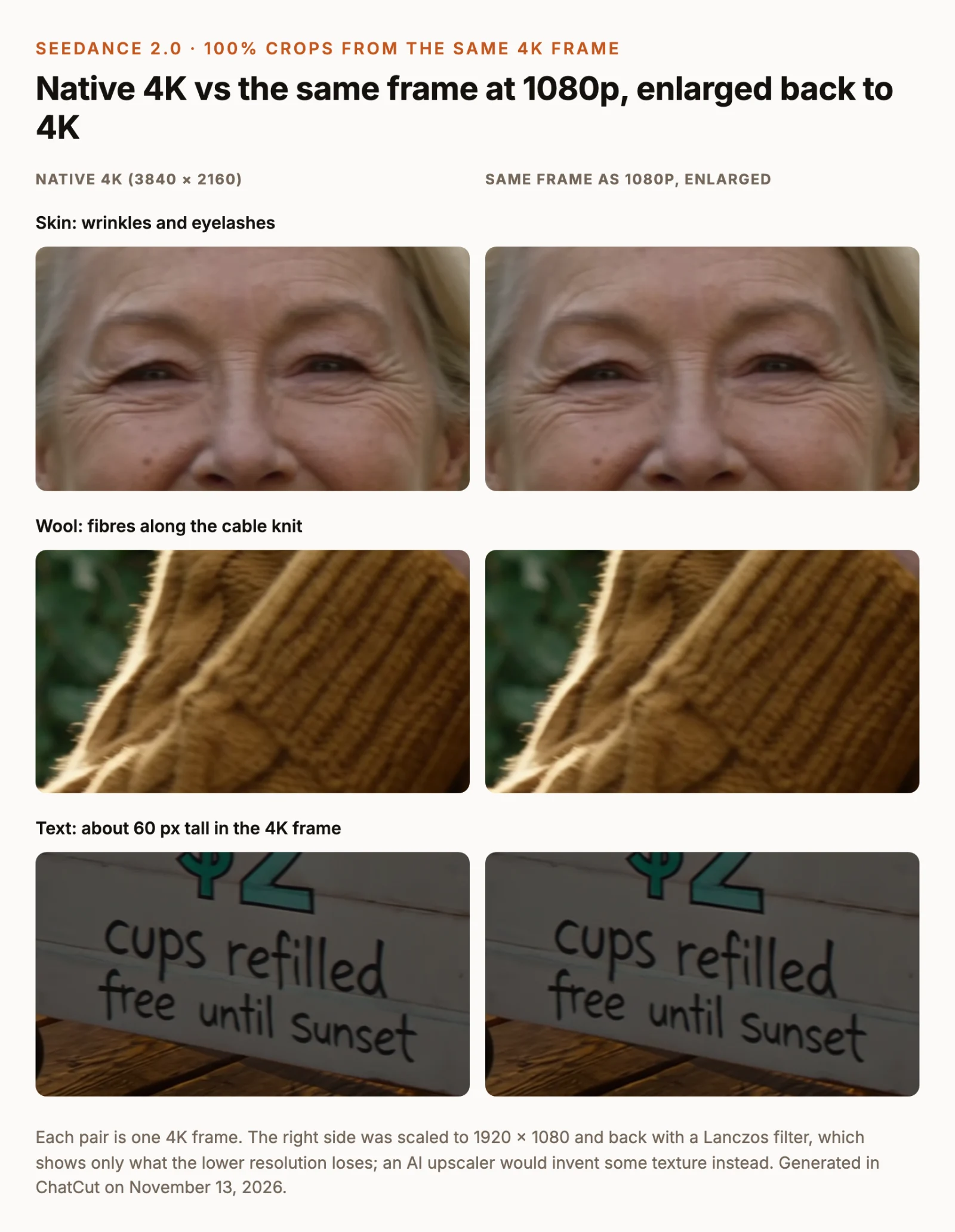
The fairest way to see what resolution alone changes is to take one 4K frame, shrink a copy to 1080p and enlarge it back, then compare the two at 100%. Same picture, only the pixel count differs.
What we saw:
- Faces and fabric gain the most. Fine wrinkles, eyelashes and loose wool fibres are visibly sharper in the native 4K crop.
- Readable text stays readable either way. The line “cups refilled free until sunset” is about 60 pixels tall in the 4K frame and legible in both versions.
- 4K doesn’t fix spelling. The small sign on the pole came out as “LLSH MONADE” at 4K. Getting text right is a prompt and model problem, not a resolution one. If your shot depends on a label or a sign, check every frame.
We also generated the same two prompts directly at 1080p. They came back as different takes, which is normal for AI video: a new generation is a new performance, whatever the resolution. The 4K portrait pushed in closer than the 1080p one, and the 1080p lemonade stand had a cart and canopy that the 4K one didn’t.
Native 4K or upscaled 1080p?
An upscaler enlarges a smaller video to 4K. A simple filter, like the Lanczos scaling in our crops, only spreads the existing pixels. An AI upscaler goes further and invents plausible texture, which can look sharp but may flicker from frame to frame or change small details such as faces. Adobe’s research on VideoGigaGAN describes exactly this trade-off between added detail and temporal consistency.
Native 4K avoids that guesswork because the model renders the detail in the first place. The trade-offs:
| Native 4K generation | 1080p + simple upscale | 1080p + AI upscaler | |
|---|---|---|---|
| Detail | Rendered by the model | None added, softer | Added by the upscaler, can drift between frames |
| Cost in ChatCut (Seedance 2.0, 10 s) | 36.31 credits | 17.81 credits | 17.81 credits plus the upscaler |
| Wait (our 5 s test) | about 10 minutes | about 4 minutes | about 4 minutes plus upscaling |
| Colour depth | 10-bit HEVC | 8-bit H.264 from Seedance 2.0 at 1080p | Depends on the upscaler’s output |
| Best for | Big screens, reframing, heavy grading | Fast drafts, social video | Rescuing a take you already love |
Why does 10-bit colour matter?
Seedance 2.0 delivers 4K as 10-bit HEVC (H.265). Its 1080p output, in our test, came back as 8-bit H.264. An 8-bit channel has 256 possible levels; a 10-bit channel has 1,024. On a smooth gradient like a sunset sky, those extra levels decide whether a colour grade stays smooth or breaks into visible steps, called banding.
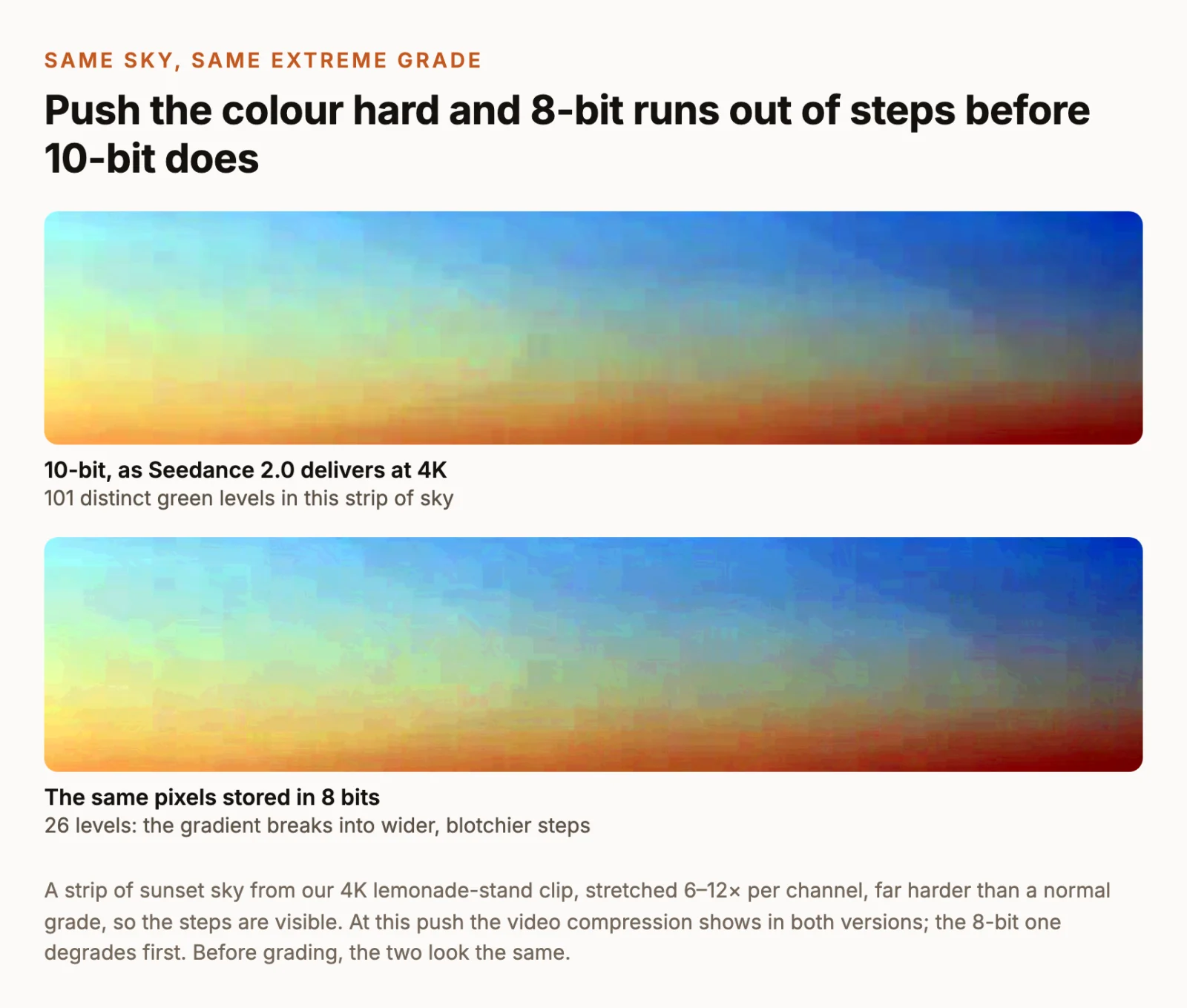
10-bit is not the same as HDR: it describes how finely colours are stored, not how bright the picture can get. If you don’t plan to grade, it makes little visible difference. If you do, keep the 10-bit file all the way through your edit and export, or the advantage disappears at the last step. EIZO’s guide to 10-bit display explains the levels in more detail.
Can I crop into a 4K clip?
Yes, and this is the most practical reason to generate at 4K. A 3840 × 2160 frame contains four full-HD frames. Crop one of them and you get a 1920 × 1080 close-up without enlarging anything.
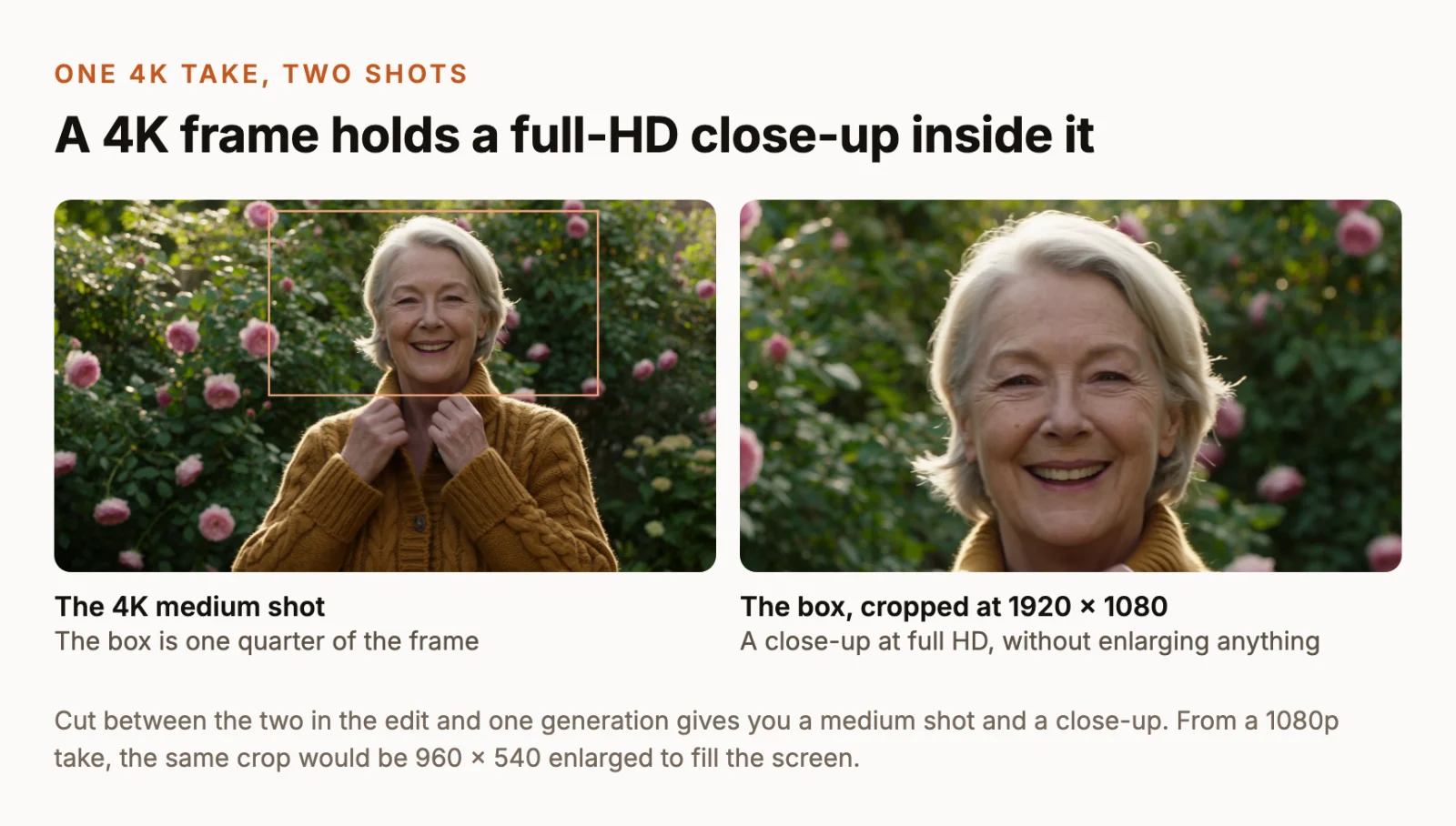
For a product video or an interview-style edit, that means one generation can give you a wide and a close-up to cut between, which helps when a second generation would give you a different performance. In ChatCut, select the clip on the timeline and set its scale and crop in the Inspector, then export the edit at 1080p.
Which AI video models generate native 4K?
As of November 13, 2026, these are the models that offer 4K output, and what their makers say about how they get there.
| Model | 4K output | How the maker describes it | Where you can use it |
|---|---|---|---|
| Seedance 2.0 | 3840 × 2160, 4–15 s, 10-bit HEVC | A 4K resolution option on the model itself (ModelArk API) | ByteDance API, ChatCut |
| Seedance 2.5 4K | 4K, 10-bit, with 480p drafts | Trained specifically for 4K (BytePlus) | ChatCut; API for selected enterprise customers |
| Kling 3.0 | 3840 × 2160 | Announced as a native 4K model (Kling) | Kling and partners |
| LTX-2 / LTX-2.5 | 4K at up to 50 fps | LTX describes LTX-2 as native 4K (LTX) | LTX API, open weights |
| Veo 3.1 | 1080p and 4K | Google says these use upscaling (Google) | Gemini API, Vertex AI |
| Runway Gen-4.5 | 720p, upscale to 4K | Upscaled after generation (Runway) | Runway |
| Luma Ray3 | 4K finish | A neural upscaler (Luma) | Luma |
Two cautions. A file that is 3840 × 2160 tells you its size, not how it was made, so rely on the maker’s description. And “native” is the maker’s claim: none of the companies above publish how their pipelines work internally. In ChatCut, Gemini Omni also offers a 4K setting, which is upscaled; Seedance 2.5 and Seedance 2.0 are the native 4K choices.
How do you make a native 4K clip in ChatCut?
- Switch the AI composer to Video Gen and choose Seedance 2.0 from the model name below the composer.
- Open Video settings, set Resolution to 4K and pick a Duration between 4 and 15 seconds.
- Add reference images or a first frame if you have them, and write the prompt.
- Check the credit estimate beside Send: 18.23 credits for 5 seconds or 36.31 for 10 in our quotes. Then send.
- Wait. Our 5-second 4K clips took about 10 minutes. Follow progress in My Assets, then drag the clip to the timeline.
The file comes back as 3840 × 2160, 24 fps, 10-bit HEVC. Our 5-second clips were 11–12 MB each, two to three times the size of the same prompts at 1080p. When you finish the edit, export at 4K to keep the resolution; Desktop local export and 4K explains where 4K export is available.
Seedance 2.5 works the same way: pick Seedance 2.5, set Resolution to 4K, and clips can run 4 to 30 seconds; 10 seconds cost 43.29 credits, about 1.6 times the 1080p price. It also lets you make a 480p draft first and turn the one you like into a 4K final of the same shot.
If you are not sure a prompt works on Seedance 2.0, test it first: a 5-second Seedance 2.0 clip at 720p costs 3.59 credits and comes back in a few minutes. Generate the 4K version once you like the shot. Note that it will be a new take, not the same clip at a higher resolution.
Prompts that pay off at 4K
These are the two prompts from our test. Both are written to put detail where 4K can show it: skin, fabric, small text and a smooth sky.
1. A close-up with skin and knit texture
Use it when you want a portrait or testimonial-style shot that will be seen large.
Check: the push-in ends close on the face, so look at the eyes and teeth in the last second. In our 4K take they held up; in the 1080p take the camera stopped at a looser close-up.
2. Small text against a gradient sky
Use it when a sign, label or package has to be read, or when you plan to grade a sky.
Check: the model added a second sign we didn’t ask for, and its text was misspelled. Ask for exactly one sign, or remove extra text in the edit. The text we did specify came out right in both the 4K and 1080p takes.
When is 1080p enough?
Most of the time. Choose 1080p when:
- The video is for social feeds or a website. Most people will watch it on a phone or in a small player, where the 4K detail we found at 100% is invisible.
- You won’t crop or grade. Reframing and colour grading are where 4K and 10-bit earn their cost.
- You are still exploring. Iterate at 720p or 1080p and generate 4K only for the shots you keep.
Choose 4K when the delivery spec asks for UHD, when the video plays on a TV, cinema or signage screen, when you plan to cut close-ups out of wide shots, or when you’ll grade the footage heavily. YouTube accepts both: its recommended upload settings list a higher bitrate for 2160p uploads, around 35–45 Mbps for 24–30 fps SDR.
Can you edit 10-bit HEVC files?
Yes, but check your hardware first, because 4K 10-bit HEVC is heavy to decode.
- Premiere Pro uses hardware decoding for HEVC on supported GPUs and Apple silicon; Adobe’s list shows which chips handle which 10-bit formats.
- DaVinci Resolve support depends on your operating system and on whether you use the free or Studio edition; see Blackmagic’s codec list.
- Final Cut Pro imports HEVC on the Macs Apple supports.
If playback stutters, edit with proxies and switch back to the original files for export. In ChatCut, the clip lands in your project and you can edit it on the timeline directly.
What about Seedance 2.5 4K?
ByteDance released Seedance 2.5 4K to selected enterprise customers in October 2026. According to BytePlus, it was trained specifically for 4K and improves on faces, small expressions and texture, uses 10-bit colour, keeps more of the quality of reference images and video, renders small text on posters and packaging more clearly, and lets you test a shot as a 480p draft before the 4K render. ByteDance names storyboards, film previsualisation, background editing and animation as early uses.
On ByteDance’s API there is no public price or general access yet. In ChatCut it is a 4K setting on Seedance 2.5: clips run 4 to 30 seconds, a 480p draft can finish at 4K, and 10 seconds cost 43.29 credits, about 1.6 times the 1080p price. Our Seedance 2.5 4K page shows what it does, and our Seedance 2.5 price guide compares what every Seedance option costs today. To decide between Seedance 2.5, its Flash variant, a draft and 4K for a particular shot, see Flash, draft or 4K.