So can Claude edit videos? Not on its own in regular chat, because it cannot open, watch, or cut video files; connected to a video editor in Claude Code, it can. We gave a 40.8-second unedited English podcast clip and one prompt to Claude, and four minutes and 47 seconds later we got back a 30.4-second vertical MP4 with the host’s interruption cut, 11 pauses tightened, styled phone captions added, and audio leveled from -23.6 to -13.1 LUFS. This test was run by Claude Opus 5.5 in Claude Code, using the ChatCut desktop connection.
Here is the honest part: the first cut was usable, not finished. To hit our rough 30-second target, Claude cut the most memorable line in the clip (though it flagged that choice in its reply and offered to swap it back), split a few captions in the middle of phrases, and left the opening four seconds noticeably soft after zooming 2.2 times into a wide two-shot. A single follow-up prompt put the best line back, trimmed a different clause instead, and exported a tighter 30.2-second cut.
Can Claude edit videos on its own?
In an ordinary conversation on claude.ai or the Claude mobile apps, no. Anthropic’s file upload guide (checked November 14, 2026) lists documents (PDF, DOCX, CSV, TXT, HTML, ODT, RTF, EPUB, JSON, and XLSX) and still images (JPEG, PNG, GIF, and WebP), with no video format on the list. Anthropic’s vision documentation adds that when you upload an animated GIF, Claude uses only the first frame. If you only need Claude to summarize or inspect a recording rather than cut it, our guide on whether Claude can watch videos walks through what works with transcripts and extracted frames.
What Claude is good at is reading a word-timed transcript, deciding which sentences carry an argument, and planning trims. When you pair Claude Code with an editor that holds the media and exposes editing tools over the Model Context Protocol (MCP), those decisions become actual cuts on a timeline.
| Task | Claude chat on its own | Claude Code + ChatCut Desktop (our test) |
|---|---|---|
| Open a local MP4 or MOV file | No (video formats are not supported in chat uploads) | Yes: imported our 40.8-second 1080p MP4 from disk |
| Read who spoke and when | Only if you transcribe elsewhere and paste text in | Yes: ran word-timed cloud transcription with speaker labels |
| Check what is in the shot | Only in still screenshots you attach yourself | Yes: pulled video frames to verify who spoke and check 9:16 crops |
| Cut pauses, fillers, and lines | Writes a paper edit on text; you cut the footage manually | Yes: compressed 11 pauses, cut the host’s line and filler, and trimmed to ~30 seconds |
| Reframe 16:9 footage to 9:16 | No | Yes: detected the camera switch, panned the wide shot onto the speaker, and center-cropped the close-up |
| Add timed captions and level audio | Can draft subtitle text if given timestamps; no audio processing | Yes: added styled lower-third captions, dialogue compression, limiting, and short fades (-13.1 LUFS) |
| Export an MP4 and keep an editable timeline | No | Yes: exported a 1080x1920 MP4 locally and kept every cut open on the ChatCut timeline |
Where you run Claude matters. ChatCut Desktop cannot be installed in claude.ai or the Claude mobile apps, and ChatCut does not document a setup for the Claude desktop app’s Chat or Cowork tabs. It connects to Claude Code running on the same Mac (macOS 13 or later) or Windows PC (Windows 10 or later on x64), either in a terminal or in the Claude desktop app’s Code tab set to a Local environment (when you cannot run Desktop, ChatCut also offers a hosted Web plugin for web projects). We skip installation steps here; for setup from scratch, read how to edit video with Claude.
You may also see two code-only approaches come up under Claude video editing. Claude Motion, in beta on Team and Enterprise plans, builds short animations as code from text, data, and images rather than cutting camera footage. Developers also pair Claude Code directly with FFmpeg commands and Remotion templates to slice files and render coded graphics from the terminal. That route outputs an MP4 without opening an editor, though fixing a cut or moving a caption means editing timestamps or code and rendering again instead of dragging an edge on a timeline.
What raw footage did we test Claude video editing on?
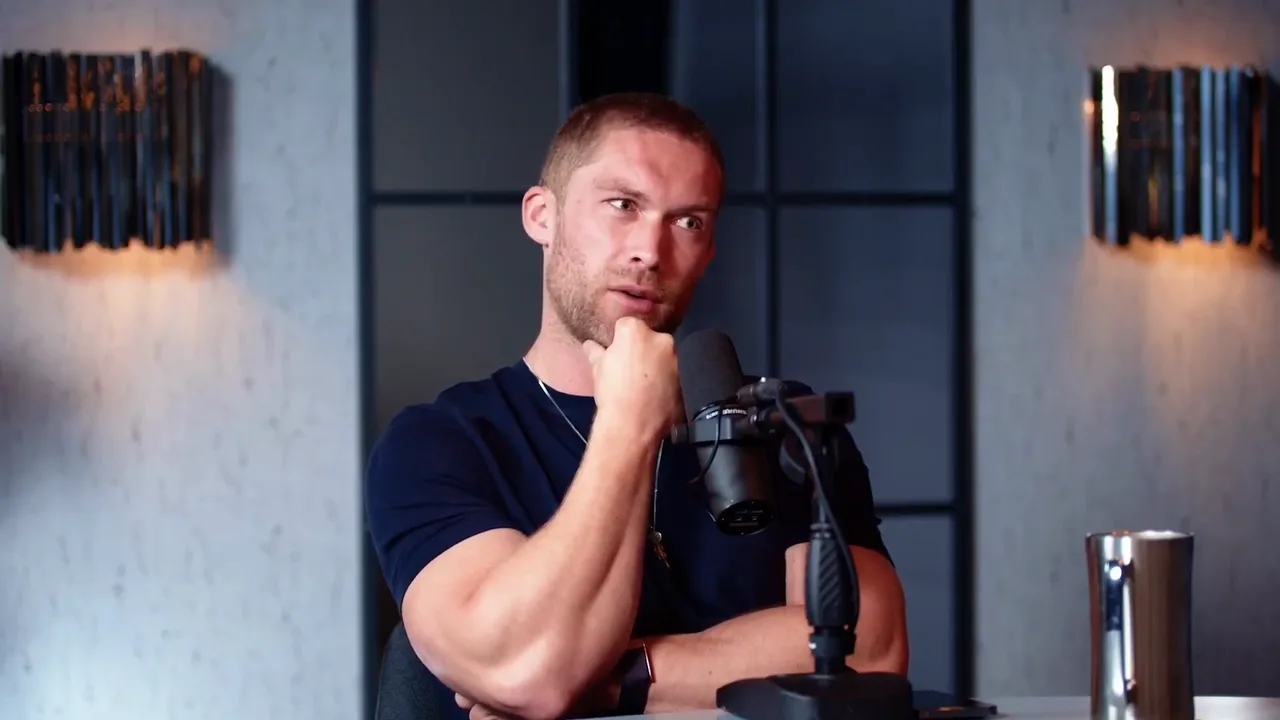
We tested on raw-take.mp4, an unedited 40.8-second English studio podcast clip (1920x1080, 30 fps, H.264/AAC, recorded at -23.6 LUFS). On the surface it looks like an easy talking-head short, yet three details in the file trip up naive automation:
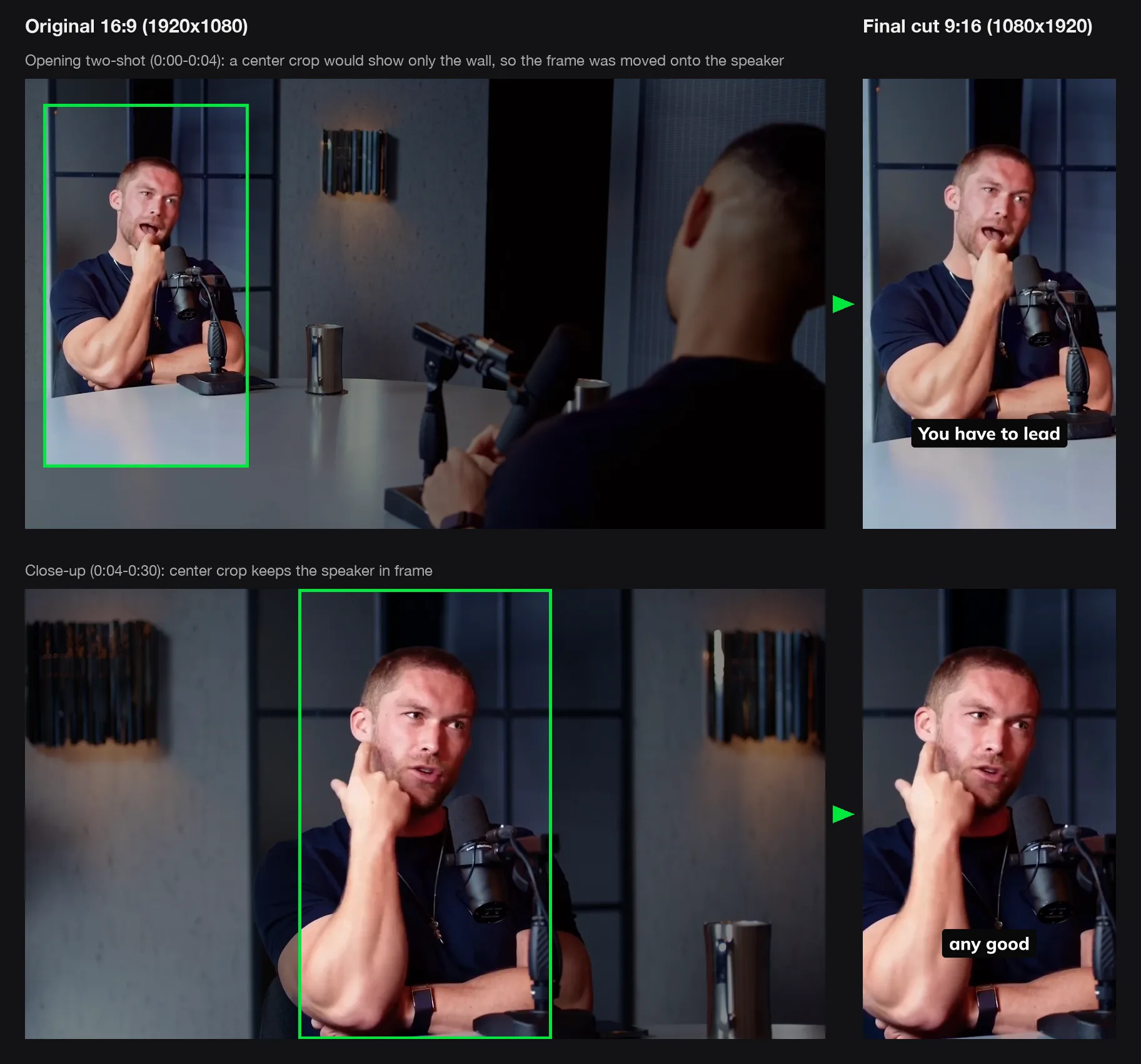
- Two camera angles in one continuous file. For the first 5.3 seconds, the camera holds a wide two-shot: the speaker sits near the left edge behind a desk microphone while the host sits in the right foreground with his back to the camera, leaving a dark gray wall, wall sconce, and metal tumbler in the center. At 5.3 seconds, the video cuts to a centered close-up of the speaker.
- A second voice right after the opening hook. Right after the speaker opens with “Act first,”, the host checks in with “okay?” (about 0.6 seconds) before the speaker continues with “You have to lead with action.”
- Clean delivery that is still 11 seconds too long. Unlike a messy solo take, the speaker has zero false starts or repeated sentences. Instead, he leaves 11 pauses longer than a quarter of a second (including 1.2-second and 1.8-second gaps), drops one “you know” filler, and speaks for 40.8 seconds total. Even after tightening dead air, hitting a 30-second brief forces Claude to cut a real sentence, not just mistakes.
The prompt we gave Claude
We wanted to test how someone actually asks for a first cut, without pre-chewing timestamps, pasting a transcript, or warning Claude about the camera switch at 5.3 seconds. Here is the exact prompt we sent in Claude Code (with our local folder shortened to ~/Movies/raw-take.mp4, plus a final line telling it which ChatCut test project to use):
What Claude actually did in 4 minutes and 47 seconds
From sending the prompt to finishing the 1080p MP4 export took 4 minutes and 47 seconds of wall-clock time. Rather than cutting blind from text alone, Claude Opus 5.5 checked frames and audio meters along the way:
- Imported the clip, transcribed it, and verified who spoke. Claude imported
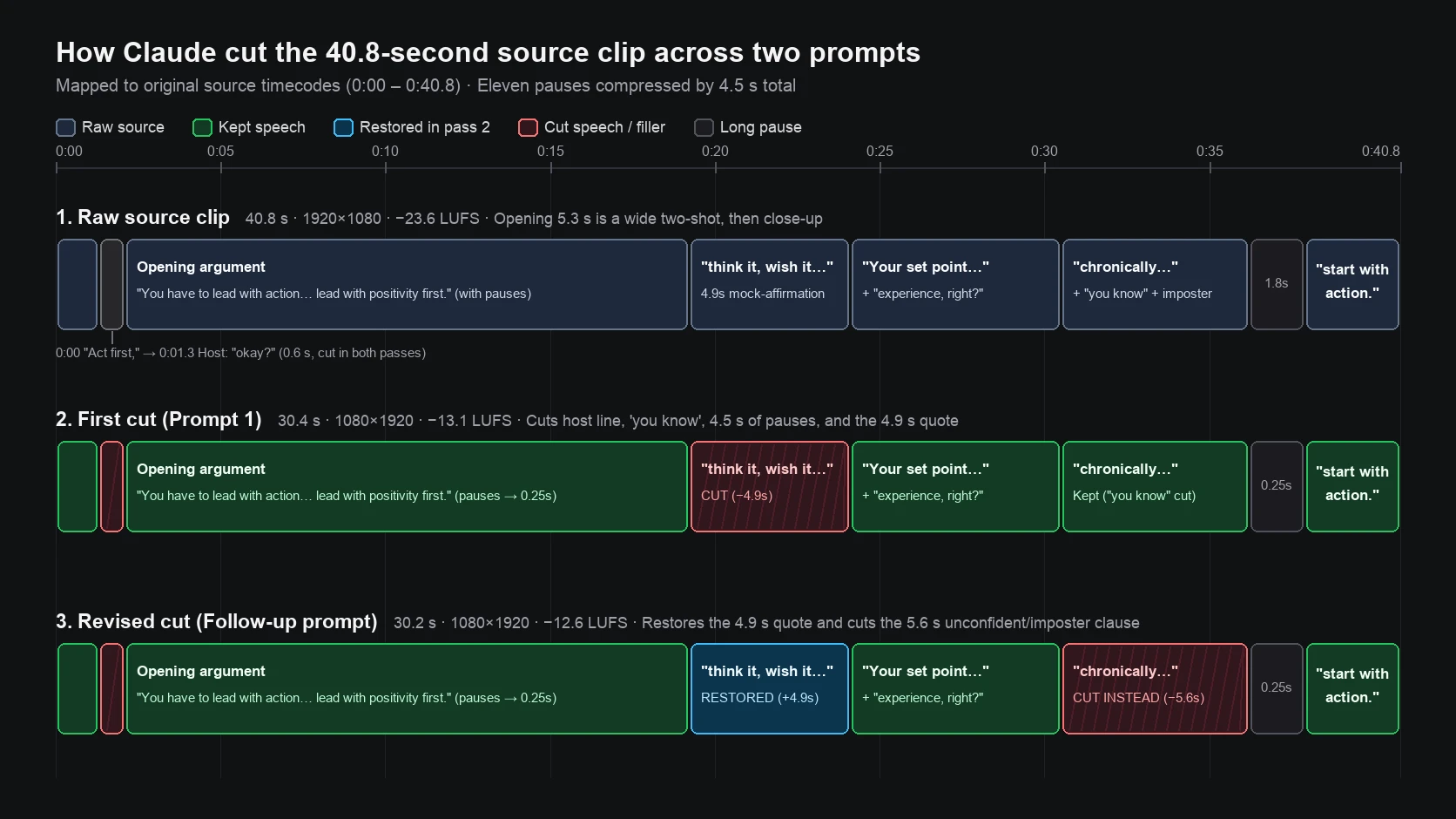
raw-take.mp4into ChatCut, waited for word-timed cloud transcription (which requires signing in to ChatCut), and sampled 12 frames across the source file. Seeing two people in the opening wide shot and a second speaker label on “okay?”, it extracted nine frames around the speaker’s mouth between 0.2 and 2.6 seconds to verify visually that the guest said “Act first,” (mouth open from 0.5 to 1.0 seconds) and the host answered “okay?” (guest’s mouth closed from 1.3 to 1.8 seconds). - Tightened 11 pauses and made one editorial cut. Automatic pause cleanup found zero “um” or “uh” fillers and compressed 11 pauses down to roughly 0.25 seconds each, removing 4.49 seconds in total. Reading the word-timed transcript, Claude deleted the host’s “okay?”, cut the filler “you know,”, kept the intentional bookend between “Act first” at the start and “you have to start with action” at the end, and cut one full 4.9-second sentence to reach 30.4 seconds: “I need to think it, wish it, believe it, and I will achieve it.”
- Caught and fixed the 9:16 center-crop trap. After converting the timeline to 1080x1920 vertical, Claude pulled six rendered viewer frames to inspect the picture. On the first four seconds of the edited timeline, a straight center crop showed only the empty wall, wall sconce, and the host’s hands, with the speaker cut out of frame. Claude ran scene-cut detection to pinpoint the camera switch at frame 121 (4.03 seconds into the edit), split the clip there, and zoomed 2.2 times while shifting the opening segments onto the speaker on the left.
- Leveled the audio and dialed back an overly loud first pass. Before processing, the cut measured -23.6 LUFS with peaks at -8.1 dBFS. Claude added dialogue compression on the voice track, a limiter on the master output, and four-frame fades on each clip edge so edits would not click. Its first limiter setting came back at -10.7 LUFS, which was hotter than needed; Claude lowered the limiter input back to 0 dB and re-measured at -13.1 LUFS with peaks at -1.0 dBFS (tightening loudness range from 4.9 to 4.3 LU).
- Styled captions for phones and exported locally. It enabled captions, browsed ChatCut’s English preset catalog, applied the Submagic preset (bold white text on dark rounded pills in the lower third, with the current spoken line highlighted in green on two-line cards), checked six viewer frames to confirm the text stayed clear of the speaker’s face, and exported a 30.4-second, 1080x1920, 30 fps MP4.
In its reply, Claude summarized every cut and flagged the one subjective choice it had made to hit 30 seconds:
One full line, to get you close to 30 seconds: “I need to think it, wish it, believe it, and I will achieve it.” The argument still holds without it (“…if you try and lead with positivity first. Your set point of negativity is going to just crush that into the ground.”). If you’d rather keep that line, it’s an easy swap, and the video would run about 35 seconds.
What tools Claude actually called: Across that pass, Claude Opus 5.5 drove ChatCut Desktop through 18 MCP tools (read_project, read_billing, push_asset, track_progress, inspect_asset, detect_scene_cuts, manage_timelines, edit_item, clean_script, read_script, apply_script, preview_timeline, split_item, inspect_item, smooth_audio, edit_captions, read_captions, and export) plus one local FFmpeg frame check on the opening two-shot.
Where the first cut fell short
We inspected 18 frames across the exported cut (the opening, before and after every edit point, the camera switch, and the close), read through the caption cards, and listened end to end. Four things separated this one-prompt cut from what a careful human editor would ship:
- It cut the most memorable sentence in the clip. Dropping “I need to think it, wish it, believe it, and I will achieve it.” kept the logical argument intact and hit 30.4 seconds, yet that mock-affirmation rhythm is the sharpest hook in the recording. Explaining the cut and offering to swap it back was the right assistant-editor behavior, even though we disagreed with the choice.
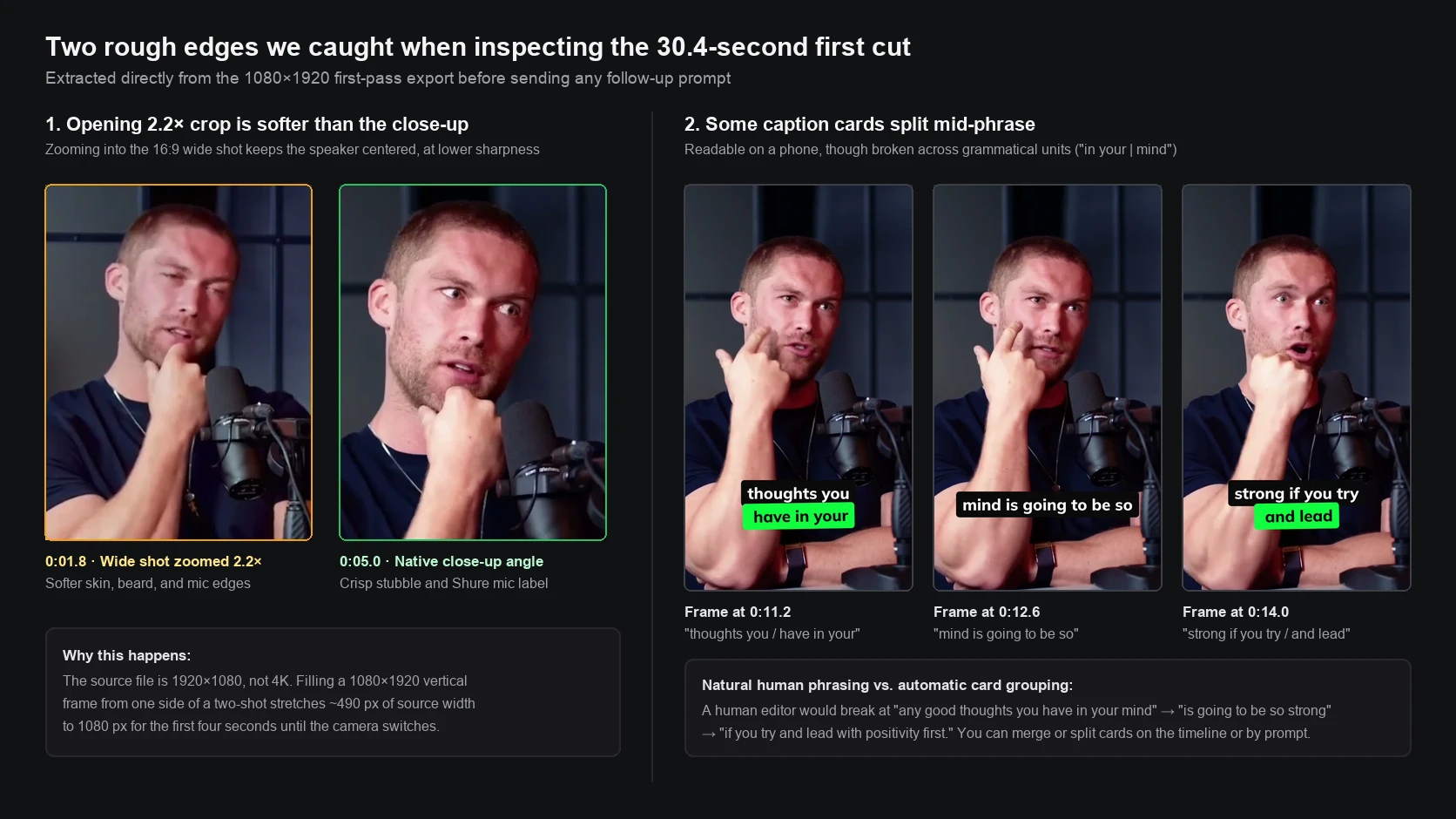
- The opening four seconds look noticeably softer than the close-up. Because the source file is 1920x1080 rather than 4K, zooming 2.2 times into the left side of the wide two-shot stretches roughly 490 pixels of horizontal source width across a 1080-pixel vertical frame. Skin texture, beard stubble, and the microphone label look soft until the camera switches to the close-up at 0:04.07.
- Several captions broke in the middle of a phrase. Automatic card grouping split “any good thoughts you have in your mind is going to be so strong if you try and lead with positivity first” into “thoughts you / have in your”, then “mind is going to be so”, then “strong if you try / and lead”. You can read every word on a phone, though a human subtitler would break those lines on clause boundaries.
- Same-angle jump cuts stay visible. Compressing 11 pauses and removing “you know” on a locked close-up leaves small head jumps at the joins. There are no black frames or audio clicks, though Claude did not invent B-roll or punch-in zooms because our prompt did not ask for them.
Treating the first cut as a first cut: one follow-up prompt
The practical advantage of keeping the edit open in ChatCut is that you can either drag a cut on the timeline yourself or give Claude a note like you would give an assistant editor. We sent one sentence back in the same Claude Code conversation:
That revision took 3 minutes and 52 seconds and produced a 30.2-second vertical export:
- Swapped the editorial cut without losing the point. Claude restored the 4.9-second “I need to think it, wish it, believe it, and I will achieve it.” line right after “…if you try and lead with positivity first,” where the speaker originally said it. To keep the runtime near 30 seconds, it trimmed a 5.6-second clause near the end instead: “As the guy that was chronically unconfident and still has, you know, the imposter syndrome that does creep in,”. Keeping “I’m speaking from personal experience, right?” right before “You have to start with action” preserved the personal stake in half the time (and Claude noted that if we wanted the imposter-syndrome clause too, cutting “I’m speaking from personal experience, right?” instead would run about 34 seconds).
- Matched framing, breath pauses, and nearby caption beats. It reframed the restored segment to match the surrounding close-up, left roughly a quarter-second pause at both new joins so the sentences did not sound glued together, and merged and split the surrounding caption cards so the restored quote landed as three clean beats: “I need to think it,”, “wish it, believe it,”, and “and I will achieve it.”, followed by “Your set point of negativity” on a single card.
- Verified frames and loudness before exporting. Claude checked 18 viewer frames across the revised cut and exported a 1080x1920 MP4 measuring -12.6 LUFS (true peak -0.7 dBFS).
How long it took and what it cost
| Pass | What ran | Wall-clock time | ChatCut credits |
|---|---|---|---|
| First cut (Prompt 1) | Import, cloud transcription, pause and script cuts, 9:16 reframe, audio leveling, captions, 1080p export | 4 min 47 s | 0 |
| Follow-up pass (Prompt 2) | Restore 4.9 s quote, trim 5.6 s clause, match close-up crop, regroup nearby captions, 18-frame check, 1080p export | 3 min 52 s | 0 |
| Total | Two prompts, two finished 1080x1920 MP4 exports + editable timeline | 8 min 39 s | 0 |
There are two separate meters to keep straight when budgeting this workflow:
- Your Claude plan pays for Claude’s thinking. Running Claude Code in the desktop app requires a Pro, Max, Ultra, Team, or Enterprise subscription, while the terminal CLI also supports Anthropic Console API billing. ChatCut does not charge conversation credits when you drive it from your own Claude Code session.
- ChatCut credits pay only for AI-generated media. We checked our ChatCut billing log after both exports and confirmed 0 credits were charged for this project. Importing footage, word-timed cloud transcription (which requires signing in to a ChatCut account), timeline cuts, audio processing, captions, and local Desktop exports do not spend credits, and local Desktop exports do not count toward the Free plan’s 60-minute cloud export allowance. Credits are only used when you ask ChatCut to generate new AI video, images, voiceovers, or music (paid plans start at $25/month for 100 credits).
What Claude still won’t do for you
Testing on real footage makes the boundaries clear before you hand it a 40-minute recording:
- It won’t edit inside claude.ai or the mobile apps. Regular chat uploads reject video files, and ChatCut Desktop connects to a local Claude Code environment on macOS or Windows, not browser or phone chats.
- It won’t invent resolution that isn’t in your camera file. Cropping a 1080p wide two-shot into a centered 9:16 vertical frame meant a 2.2x zoom and four softer seconds. Record wide angles in 4K if you plan to punch in for vertical shorts.
- It won’t read your mind when cutting clean speech to a tight length. With zero stumbles to delete, Claude picked a logical 4.9-second example sentence to cut, which happened to be our favorite line. Treat the first prompt as a rough cut and expect to give at least one note.
- It won’t phrase every caption card like a human subtitler automatically. Preset captions were accurate and clear of the speaker’s face, yet several untouched cards earlier in the clip still broke mid-phrase (“have in your | mind”). Ask Claude to merge awkward splits or tweak them directly on the ChatCut timeline.
- It won’t watch your video in real time from start to finish. Claude works from word-timed transcripts, audio loudness meters, scene-cut detection, and sampled still frames (12 to 18 frames per pass in our run). Always play the exported MP4 yourself before posting so you catch anything that falls between sampled frames.
Frequently asked questions about Claude video editing
Can Claude edit videos for you?
Can I upload a video to Claude and have it edited?
Is there a built-in Claude video editor?
Do I need a paid Claude plan to edit videos with Claude Code?
Should I just paste my transcript into Claude instead?
Claude or ChatGPT for video editing: do both work the same way?
Claude is still not a replacement for your eye on the final pass, yet pairing Claude Opus 5.5 in Claude Code with ChatCut turned a raw two-angle clip into a leveled, captioned vertical cut in under five minutes and handled our editorial note on the next prompt while leaving every cut open on a timeline.